Choose the base of your number and enter the number written in that base. The page converts it to binary, octal, decimal and hexadecimal at once and shows the steps.
Table of Contents
-
What you can do on this page
-
What is this calculation used for?
-
How to Use
-
Formula
-
Symbols and terms
-
Good to know before you start
-
How to calculate it in Excel
-
How to calculate it in Google Sheets
-
How to calculate it in Python
-
How to write it in LaTeX and other math languages (copy and paste)
-
How to have ChatGPT do the calculation
-
DataChef Features
-
Related Features
-
NumberChef Calculators List
What you can do on this page
- Choose the base of your number (binary, octal, decimal or hexadecimal) and enter it, and you see the same number in all four bases at once
- Answers questions like "What is hex 2AA in decimal?" or "What is 170 in binary?" in one step
- It shows the place value expansion (each digit × its place value, all added up) and the repeated division by the base with the remainders, so you learn how the conversion works
- Useful for studying base conversion and checking answers for computer science classes and IT certification exams
- A plain-language explanation of the formulas and copy-and-paste formulas for Excel, Google Sheets and Python are all on this page
What is this calculation used for?
Base conversion is a standard topic in high school and college computer science courses, such as AP Computer Science Principles, and in IT certification exams such as CompTIA A+ and Network+.
Questions like "What is binary 1010 in decimal?" or "Write decimal 45 in binary" use exactly the two methods on this page: the place value expansion and the repeated division with remainders. Practicing with the steps shown helps you work through them without getting stuck on the exam.
Colors on web pages are set with hexadecimal color codes such as "#FF5733". The code lists the strength of red, green and blue as two hex digits each (00 to FF = 0 to 255 in decimal), so #FF5733 is red FF (255), green 57 (87) and blue 33 (51).
Once you can move between hexadecimal and decimal, you can picture color changes such as "a little less red" directly from the numbers in the code.
The 755 in "chmod 755", a command often used on servers, is an octal number. Each octal digit matches 3 binary digits, and 755 in binary is 111 101 101 - on/off switches for "read, write, execute", 3 bits each for the owner, the group and everyone else.
Once you understand number bases, this number is no longer a secret code but a table of bit switches.
An IP address, such as 192.168.1.1, is really a binary number split into four 8-bit parts: 192 is 11000000 and 255 is 11111111.
Networking basics such as "the subnet mask 255.255.255.0 marks the first 24 bits are the network part" only make sense once you can convert between decimal and binary. This knowledge is the foundation for network engineering work and for certifications such as CCNA.
"One byte = 8 bits, which can hold 0 to 255 (00 to FF in hex)" and "memory addresses and error codes are shown in hex, such as 0x7FFF" - binary and hexadecimal are the common language for learning what happens inside a computer.
Topics that often trip up programming students, such as bitwise operations, character codes and color values, become much clearer once you can convert between bases freely.
Formula
Symbols and terms
Symbols
| \(b\) | bee | The base (radix), the number that tells which number system is used. On this page it is 2, 8, 10 or 16. (From "base".) |
| \(d_i\) | dee sub i | The digit in position \(i\), counting from the right (the rightmost digit is position 0). In hexadecimal it can also be A to F (10 to 15 in decimal). (From "digit".) |
| \(i\) | i | The digit position. The rightmost digit is \(i=0\), and it goes up by 1 for each digit to the left. |
| \(N\) | N | The value in decimal. The conversion steps on this page always go through this decimal value. |
| \(\sum\) | sigma | The symbol for "add them all up" (summation). \(\sum_{i=0}^{k}\) says "let \(i\) go from 0 to \(k\) and add up all the terms". |
| \(q\) | q | The quotient of a division. To convert decimal to base \(n\), keep dividing until the quotient is 0. (From "quotient".) |
| \(r\) | r | The remainder of a division. The remainders become the digits of the base \(n\) number, starting from the rightmost digit. (From "remainder".) |
| \(2\mathrm{AA}_{16}\) | two A A, base sixteen | The small 16 written at the lower right of a number tells you "this number is written in base 16 (hexadecimal)". In the same way, \(1010_{2}\) is a binary number. This notation is used when the base might be unclear. Programmers also write hexadecimal with the prefix 0x, as in 0x2AA. |
Terms
| base (radix) | The rule for how many of something make one group (a carry to the next digit) when you count. Everyday numbers group by 10 (decimal), and computers work internally in groups of 2 (binary). The group size (2, 8, 10, 16 and so on) is called the base or radix. |
| positional notation | A way of writing numbers where each digit position has its own place value. It works just like decimal 682 standing for \(6 \times 100 + 8 \times 10 + 2 \times 1\); in binary, octal and hexadecimal, the place values are powers of 2, 8 and 16. |
| binary | A way of writing numbers with only two digits, 0 and 1 (base 2). Computers handle information as electrical on and off states, so all their internal calculations are done in binary. |
| octal | A way of writing numbers with the eight digits 0 to 7 (base 8). One octal digit matches 3 binary digits. It is used for file permissions in Linux and Unix, such as "755". |
| hexadecimal | A way of writing numbers with sixteen symbols, 0 to 9 and A to F (A is 10, B is 11, …, F is 15), also called hex (base 16). One hex digit matches 4 binary digits, so programmers use it widely to write long binary numbers in a short form. |
| bit | One binary digit. It is the smallest unit of information a computer handles, and its value is either 0 or 1. |
| nibble | A group of 4 bits (one hex digit). Two nibbles make one byte. |
| byte | A group of 8 bits (two hex digits). One byte holds 256 different values, from 00 to FF in hex, which is why bytes and hexadecimal go so well together. |
Good to know before you start
Here is what helps you use the calculation on this page with real understanding, not just by pressing the button.
| Place value in the decimal system (elementary school) |
|
| Division with remainders (Grades 3–4) |
|
| Powers and exponents (Grades 6–8) |
|
| Number bases (high school math and computer science) |
|
How to calculate it in Excel
| Decimal value | 170 |
| Binary | =DEC2BIN(B1) |
| Octal | =DEC2OCT(B1) |
| Hexadecimal | =DEC2HEX(B1) |
| Binary | 10101010 |
| Decimal | =BIN2DEC(B1) |
| Hexadecimal | 2AA |
| Decimal | =HEX2DEC(B1) |
| Decimal value | 1500 |
| Hexadecimal (BASE) | =BASE(B1,16) |
| Back from hexadecimal to decimal (DECIMAL) | =DECIMAL(B2,16) |
Note that these functions have size limits. DEC2BIN works only from −512 to 511 (results of up to 10 binary digits), DEC2OCT from −536,870,912 to 536,870,911, and DEC2HEX from −549,755,813,888 to 549,755,813,887. The reverse functions BIN2DEC, OCT2DEC and HEX2DEC also accept at most 10 digits; more than 10 digits gives an error, and with exactly 10 digits and a leading 1 bit (a leading 8 to F in hex), the value is read as a negative number (two's complement).
For larger numbers, use the BASE function (decimal → base n) and the DECIMAL function (base n → decimal) in the fourth table (Excel 2013 or later; they handle numbers up to about 9 quadrillion, 2 to the 53rd power minus 1).
How to calculate it in Google Sheets
| Decimal value | 170 |
| Binary | =DEC2BIN(B1) |
| Octal | =DEC2OCT(B1) |
| Hexadecimal | =DEC2HEX(B1) |
| Binary | 10101010 |
| Decimal | =BIN2DEC(B1) |
| Hexadecimal | 2AA |
| Decimal | =HEX2DEC(B1) |
| Decimal value | 1500 |
| Hexadecimal (BASE) | =BASE(B1,16) |
| Back from hexadecimal to decimal (DECIMAL) | =DECIMAL(B2,16) |
The size limits, such as DEC2BIN working only from −512 to 511, are the same as in Excel. For larger numbers, use the BASE and DECIMAL functions.
How to calculate it in Python
number = "2AA"   # the number to convert (written in its own base)
from_base = 16   # the base of that number (2, 8, 10 or 16)

value = int(number, from_base)    # first turn it into a decimal integer

binary = format(value, "b")       # binary
octal = format(value, "o")        # octal
hexadecimal = format(value, "X")  # hexadecimal (upper case)

print(f"Decimal: {value}")
print(f"Binary: {binary}")
print(f"Octal: {octal}")
print(f"Hexadecimal: {hexadecimal}")
How to write it in LaTeX and other math languages (copy and paste)
N = Σ dᵢ × bⁱ
N = \sum_{i=0}^{k} d_i \times b^{i}
<math xmlns="http://www.w3.org/1998/Math/MathML" display="block">
<mrow>
<mi>N</mi>
<mo>=</mo>
<munderover>
<mo>∑</mo>
<mrow><mi>i</mi><mo>=</mo><mn>0</mn></mrow>
<mi>k</mi>
</munderover>
<msub><mi>d</mi><mi>i</mi></msub>
<mo>×</mo>
<msup><mi>b</mi><mi>i</mi></msup>
</mrow>
</math>
N = sum_(i=0)^k d_i * b^i
FromDigits[{2, 10, 10}, 16]
N := add(d[i]*b^i, i = 0 .. k);
N = polyval(d, b);
N = ∑_(i=0)^k d_i × b^i
N = b × q + r (0 ≤ r < b)
N = b \times q + r \quad (0 \le r < b)
<math xmlns="http://www.w3.org/1998/Math/MathML" display="block">
<mrow>
<mi>N</mi>
<mo>=</mo>
<mi>b</mi>
<mo>×</mo>
<mi>q</mi>
<mo>+</mo>
<mi>r</mi>
</mrow>
</math>
N = b q + r, \ 0 <= r < b
QuotientRemainder[682, 16]
q := iquo(n, b); r := irem(n, b);
q = floor(n/b); r = mod(n, b);
N = b × q + r (0 ≤ r < b)
h = b₃×2³ + b₂×2² + b₁×2¹ + b₀×2⁰
h = b_3 \times 2^3 + b_2 \times 2^2 + b_1 \times 2^1 + b_0 \times 2^0
<math xmlns="http://www.w3.org/1998/Math/MathML" display="block">
<mrow>
<mi>h</mi>
<mo>=</mo>
<msub><mi>b</mi><mn>3</mn></msub><mo>×</mo><msup><mn>2</mn><mn>3</mn></msup>
<mo>+</mo>
<msub><mi>b</mi><mn>2</mn></msub><mo>×</mo><msup><mn>2</mn><mn>2</mn></msup>
<mo>+</mo>
<msub><mi>b</mi><mn>1</mn></msub><mo>×</mo><msup><mn>2</mn><mn>1</mn></msup>
<mo>+</mo>
<msub><mi>b</mi><mn>0</mn></msub><mo>×</mo><msup><mn>2</mn><mn>0</mn></msup>
</mrow>
</math>
h = b_3*2^3 + b_2*2^2 + b_1*2 + b_0
FromDigits[{b3, b2, b1, b0}, 2]
h := 8*b3 + 4*b2 + 2*b1 + b0;
h = 8*b3 + 4*b2 + 2*b1 + b0;
h = b_3 × 2^3 + b_2 × 2^2 + b_1 × 2^1 + b_0 × 2^0
How to have ChatGPT do the calculation
You are a number base conversion assistant. Do the following calculation by actually running Python code, and base your answer only on the numbers from the execution result (do not answer by mental math or guessing).

Convert hexadecimal 2AA to each of these bases:
1. Decimal
2. Binary
3. Octal

For the hexadecimal-to-decimal conversion, also show the expansion of each digit × its place value (a power of 16).
Show the code you used and the numbers from the execution result.
How to Use
-
1Enter your numbersType the numbers you want to calculate with into the input fields
-
2CalculatePress the "Calculate" button
-
3Check the resultThe result appears on the spot. The same page also explains the idea behind the calculation and the formula
DataChef Features

No technical knowledge required.
Intuitive and user-friendly operation.

Can be used without registering personal information.

Automatic file deletion by clicking "download".

and rapid file conversion.

No attribution required.

No need to contact us for commercial use permission.
Related Features
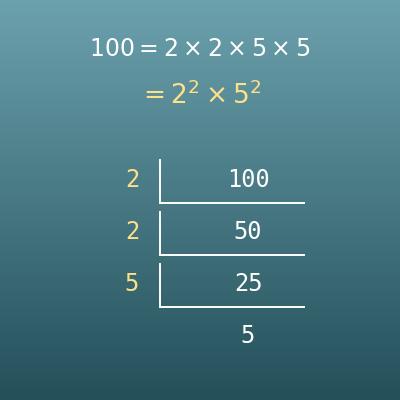
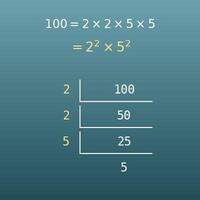
Prime Factorization Calculator
Breaks a whole number down into a product of prime numbers, with the steps shown
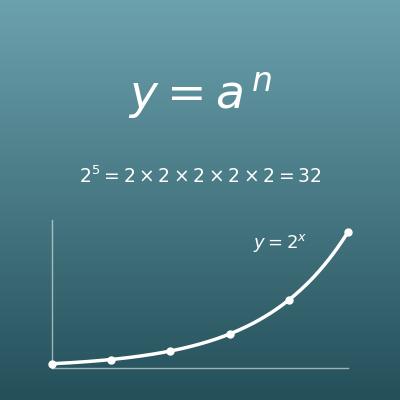
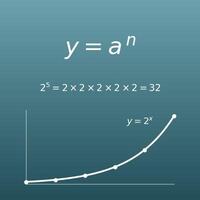
Exponent Calculator (Powers, a to the nth Power)
Calculates a power from its base and exponent. Handy for checking place values such as 2 to the 10th power
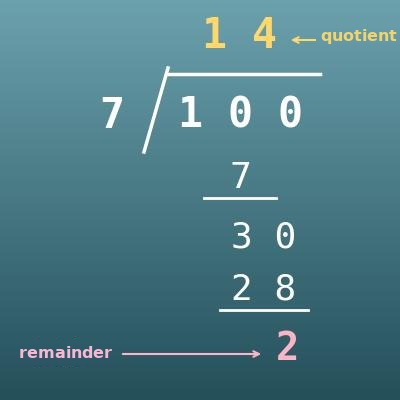
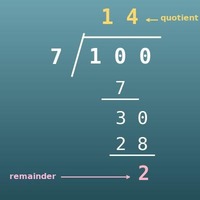
Long Division Calculator with Remainders (Step by Step)
Divides whole numbers step by step with long division. Good practice for the quotients and remainders used in base conversion
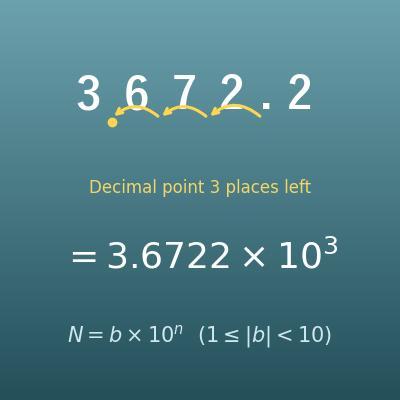
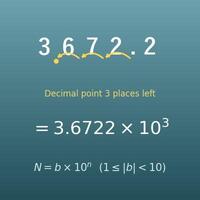
Scientific Notation Converter (b×10ⁿ, E Notation, Engineering Notation)
Another way to write numbers. Converts a number such as 3672.2 into scientific notation, 3.6722 × 10³