Choose the direction of the conversion and enter the coefficients of the circle. The equation below is linked to the input fields, so you can also edit the coefficients in the equation directly. To check how a line meets the circle, choose "Also check the line px + qy + s = 0" in the last drop-down.
Table of Contents
-
What you can do on this page
-
What is this calculation used for?
-
How to Use
-
Formulas and figures
-
Symbols and terms
-
Good to know before you start
-
How to calculate it in Excel
-
How to calculate it in Google Sheets
-
How to calculate it in Python
-
How to write it in LaTeX and other math languages (copy and paste)
-
How to have ChatGPT do the calculation
-
DataChef Features
-
Related Features
-
NumberChef Calculators List
What you can do on this page
- Complete the square to turn the general form of a circle \(x^{2} + y^{2} + lx + my + n = 0\) into standard form \((x - a)^{2} + (y - b)^{2} = r^{2}\), and get the center and radius as exact values with fractions and \(\sqrt{\ }\) (with steps)
- You can also go the other way: expand from the center and the right side (the radius squared) to get the general form
- If the right side \(r^{2}\) is 0 or less, the equation is not a circle (it is a single point, or there is no graph). The calculator tells you which, and why
- It also tells you how a line \(px + qy + s = 0\) meets the circle (at two points, tangent, or not at all) by comparing the distance \(d\) from the center to the line with the radius \(r\), and gives the intersection points as exact values
- The calculator shows the equation of the circle the way you would write it by hand, and you can edit the coefficients right in the equation. You can check the result on a figure of the circle and the line
What is this calculation used for?
In 2D games, it is standard to model the hitbox of a character or a bullet as a circle. Whether a bullet's path (a line) hits an enemy's circle is decided exactly by this page's check: compare the distance \(d\) from the center to the line with the radius \(r\). Whether two circles overlap is decided the same way, by comparing the distance between their centers with the sum of their radii.
Circles are used because their shape does not change when they turn, and one distance calculation settles the check. If you learn game programming, you will see equations of circles at work in every frame.
Under ideal conditions with no obstacles, the area a cell tower or Wi-Fi router can reach is modeled as a circle centered at the antenna (radius = the range). "Is this spot in range?" is a comparison of the distance from the center with the radius, in other words, a check of whether the spot is inside or outside the circle.
Real signals are affected by terrain and buildings, so they do not follow this exactly. Still, circle models are a starting point for deciding where to put towers so that there are no gaps in coverage.
GPS positioning is based on this idea: once you know your distance from a satellite, the places you could be narrow down to a sphere (a circle, if you think in a plane). Solving the circles (spheres) of distances from several satellites together gives the point where they meet, which is your location.
The real calculation is in 3D and also corrects for clock errors, so it is more complicated. But the idea of the equation of a circle, "the set of points at a fixed distance", is its foundation.
Drawings of machine parts and buildings are full of circles: bolt holes, curved edges, cross sections of pipes and so on. CAD software stores a circle as "the coordinates of the center and the radius", which is the information in the standard form, and it calculates where circles and lines cross, and tangent lines, every time you edit a shape.
Checks like "if I drill a hole here, is it far enough from the edge?" also come down to calculating distances from a center.
The basic shape of a curve on a road or railway is an arc of a circle, called a circular curve, and design drawings manage it by its center and radius. The smaller the radius, the sharper the curve, so road design standards set a minimum curve radius for each design speed.
Where a straight section joins a curve smoothly, the condition "the line is tangent to the circle" is used directly. The idea of a tangent line shapes real roads.
Formulas and figures
Symbols and terms
Symbols
| \((x,\ y)\) | x, y | The coordinates of a point moving on the circle. The equation of a circle says: "collect every \((x,\ y)\) that makes this true, and you get the circle". |
| \(a,\ b\) | a, b | The letters for the center \((a,\ b)\) of the circle. Letters from the start of the alphabet are usually used for fixed numbers. Unlike the moving \(x\) and \(y\), they stay fixed for one circle. Many US textbooks write the center as \((h,\ k)\). |
| \(r\) | are | The radius of the circle, from the first letter of "radius". Note that the right side of the standard form is not \(r\) itself but its square \(r^{2}\). |
| \(\mathrm{C}\) | see | A letter often used for the center of a circle, from the first letter of "center". The circle itself is sometimes named \(C\) too. |
| \(l,\ m,\ n\) | l, m, n | The coefficients of the general form \(x^{2} + y^{2} + lx + my + n = 0\). Many textbooks write them as \(D,\ E,\ F\) (\(x^{2} + y^{2} + Dx + Ey + F = 0\)); the meaning is the same. |
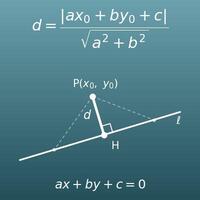
| \(d\) | dee | The distance from the center to the line, from the first letter of "distance". Comparing it with the radius \(r\) tells you how the line meets the circle. |
| \(p,\ q,\ s\) | p, q, s | The coefficients of the line \(px + qy + s = 0\) on this page. A line is usually written \(ax + by + c = 0\), but this page uses other letters so they do not clash with the center \((a,\ b)\). |
| \(\sqrt{\ }\) | square root (radical sign) | The sign for the positive number whose square is the number inside (the square root). The radius is found as \(r = \sqrt{r^{2}}\). For example, if \(r^{2} = 8\), then \(r = \sqrt{8} = 2\sqrt{2}\). |
Terms
| circle | The figure made of all the points in a plane at a fixed distance (the radius) from one point (the center). The equation of a circle is this "fixed distance" definition written as an equation. |
| equation of a circle | An equation that describes a circle on the coordinate plane. The points \((x,\ y)\) that satisfy it make up exactly the circle. It is taught in high school Geometry and Algebra 2. |
| standard form | The form \((x - a)^{2} + (y - b)^{2} = r^{2}\) (often written \((x - h)^{2} + (y - k)^{2} = r^{2}\)). Its strength is that you can read the center \((a,\ b)\) and the radius \(r\) just by looking at it. |
| general form | The form \(x^{2} + y^{2} + lx + my + n = 0\), made by expanding and simplifying the standard form. You cannot read the center or radius directly, but since it is already expanded, it is easy to work with during calculations. |
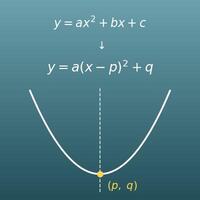
| completing the square | Rewriting an expression such as \(x^{2} + lx\) as "(something) squared plus a constant", as in \(\left(x + \dfrac{l}{2}\right)^{2} - \dfrac{l^{2}}{4}\). It is also used to find the vertex of a quadratic function, and it is the core technique of this page. |
| center | The middle point of a circle, the same distance (the radius) from every point on the circle. The \((a,\ b)\) in the standard form is the center. |
| radius | The distance \(r\) from the center to a point on the circle. As a length, it is always positive. It is found by taking the square root of the right side \(r^{2}\) of the standard form. |
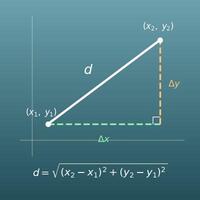
| Pythagorean theorem | The theorem that in a right triangle, the square of the hypotenuse equals the sum of the squares of the other two sides. It is the basis of the distance between two points, and the standard form of a circle is this theorem written as an equation. It is taught in Grade 8. |
| intersection point | A point that lies on both of two figures. For a circle and a line, there are 2 when the line crosses the circle, 1 when it is tangent, and 0 when it misses. The coordinates are found by solving the two equations together. |
| tangent | A line is tangent to a circle when they share exactly one point. The line is called a tangent line, and the shared point is the point of tangency. The distance from the center to a tangent line is exactly the radius. |
| chord | When a line crosses a circle at two points, the segment between those points is a chord. The perpendicular from the center to a chord cuts it exactly in half, so half the chord, the distance \(d\) from the center to the line and the radius \(r\) are linked by the Pythagorean theorem. |
| distance from a point to a line | The length of the perpendicular from a point to a line (the shortest distance from the point to the line). It is calculated with \(d = \dfrac{|ax_0 + by_0 + c|}{\sqrt{a^{2} + b^{2}}}\) and is used to decide how a line meets a circle. |
| discriminant | The expression \(D = b^{2} - 4ac\) that tells how many solutions the quadratic equation \(ax^{2} + bx + c = 0\) has. The discriminant of the quadratic you get by solving the circle and line equations together also tells how they meet (\(D > 0\): two points, \(D = 0\): tangent, \(D < 0\): no points). |
| coordinate plane | A plane made by crossing a horizontal number line (the \(x\)-axis) and a vertical number line (the \(y\)-axis) at a right angle, so that every point can be written as a pair of numbers \((x,\ y)\). It is where geometry and equations meet. |
Good to know before you start
Here is what helps you use the calculation on this page with real understanding, not just by pressing the button.
If you get stuck, going back to review these topics is the fastest way forward.
| The coordinate plane and coordinates of points (Grades 5–6) |
|
| The Pythagorean theorem and the distance formula (Grade 8) |
|
| Square roots (Grade 8 and Algebra 1) |
|
| Expanding, factoring and completing the square (Algebra 1 and Algebra 2) |
|
| Distance from a point to a line (Geometry and Precalculus) |
|
How to calculate it in Excel
| x coefficient l | -4 |
| y coefficient m | -6 |
| Constant n | 9 |
| Center x-coordinate (−l/2) | =-B1/2 |
| Center y-coordinate (−m/2) | =-B2/2 |
| Radius squared r² (l²/4 + m²/4 − n) | =B1^2/4+B2^2/4-B3 |
| Radius r (a circle only if r² > 0) | =IF(B6>0,SQRT(B6),"not a circle") |
| Center x-coordinate a | 1 |
| Center y-coordinate b | -2 |
| Right side (radius squared r²) | 9 |
| x coefficient l (−2a) | =-2*B1 |
| y coefficient m (−2b) | =-2*B2 |
| Constant n (a² + b² − r²) | =B1^2+B2^2-B3 |
| Center x-coordinate a | 2 |
| Center y-coordinate b | 3 |
| Radius r | 2 |
| Line's x coefficient p | 3 |
| Line's y coefficient q | 4 |
| Line's constant s | -8 |
| Distance d from center to line | =ABS(B4*B1+B5*B2+B6)/SQRT(B4^2+B5^2) |
| Result | =IF(B7<B3,"two points",IF(B7=B3,"tangent","no points")) |
The first table is the example x²+y²−4x−6y+9=0: center (2, 3), r²=4 and radius 2. If r² is 0 or less, the equation is not a circle, and the cell shows "not a circle".
The second table is the example with center (1, −2) and r²=9: l=−2, m=4, n=−4, so the equation is x²+y²−2x+4y−4=0.
The third table is the example of the circle (x−2)²+(y−3)²=4 and the line 3x+4y−8=0. d=2 equals the radius 2, so the result is "tangent". SQRT can have small decimal errors, so for an exact tangent check it is safer to compare d² and r² (compare =(B4*B1+B5*B2+B6)^2/(B4^2+B5^2) with B3^2).
How to calculate it in Google Sheets
| x coefficient l | -4 |
| y coefficient m | -6 |
| Constant n | 9 |
| Center x-coordinate (−l/2) | =-B1/2 |
| Center y-coordinate (−m/2) | =-B2/2 |
| Radius squared r² (l²/4 + m²/4 − n) | =B1^2/4+B2^2/4-B3 |
| Radius r (a circle only if r² > 0) | =IF(B6>0,SQRT(B6),"not a circle") |
| Center x-coordinate a | 1 |
| Center y-coordinate b | -2 |
| Right side (radius squared r²) | 9 |
| x coefficient l (−2a) | =-2*B1 |
| y coefficient m (−2b) | =-2*B2 |
| Constant n (a² + b² − r²) | =B1^2+B2^2-B3 |
| Center x-coordinate a | 2 |
| Center y-coordinate b | 3 |
| Radius r | 2 |
| Line's x coefficient p | 3 |
| Line's y coefficient q | 4 |
| Line's constant s | -8 |
| Distance d from center to line | =ABS(B4*B1+B5*B2+B6)/SQRT(B4^2+B5^2) |
| Result | =IF(B7<B3,"two points",IF(B7=B3,"tangent","no points")) |
How to calculate it in Python
from fractions import Fraction
import math

# Coefficients of the general form x² + y² + lx + my + n = 0 (a fraction such as 3/4 can be written as Fraction(3, 4))
coef_l = Fraction(-4)
coef_m = Fraction(-6)
coef_n = Fraction(9)

center_x = -coef_l / 2
center_y = -coef_m / 2
radius_squared = coef_l ** 2 / 4 + coef_m ** 2 / 4 - coef_n

print(f"Center: ({center_x}, {center_y})")
print(f"Radius squared r²: {radius_squared}")
if radius_squared > 0:
    print(f"Radius r: {math.sqrt(radius_squared)}")
elif radius_squared == 0:
    print("Not a circle: it describes only one point, the center")
else:
    print("Not a circle: no point satisfies this equation")

# Position relative to the line px + qy + s = 0 (d² and r² are compared as fractions, so there is no rounding error)
line_p = Fraction(3)
line_q = Fraction(4)
line_s = Fraction(-8)
distance_squared = (line_p * center_x + line_q * center_y + line_s) ** 2 / (line_p ** 2 + line_q ** 2)
if distance_squared < radius_squared:
    print("The circle and the line meet at two different points")
elif distance_squared == radius_squared:
    print("The line is tangent to the circle")
else:
    print("The circle and the line do not meet")
How to write it in LaTeX and other math languages (copy and paste)
(x − a)² + (y − b)² = r²
(x - a)^{2} + (y - b)^{2} = r^{2}
<math xmlns="http://www.w3.org/1998/Math/MathML" display="block">
<mrow>
<msup><mrow><mo>(</mo><mi>x</mi><mo>−</mo><mi>a</mi><mo>)</mo></mrow><mn>2</mn></msup>
<mo>+</mo>
<msup><mrow><mo>(</mo><mi>y</mi><mo>−</mo><mi>b</mi><mo>)</mo></mrow><mn>2</mn></msup>
<mo>=</mo>
<msup><mi>r</mi><mn>2</mn></msup>
</mrow>
</math>
(x - a)^2 + (y - b)^2 = r^2
(x - a)^2 + (y - b)^2 == r^2
(x - a)^2 + (y - b)^2 = r^2;
(x - a)^2 + (y - b)^2 == r^2
(x - a)^2 + (y - b)^2 = r^2
(x + l/2)² + (y + m/2)² = l²/4 + m²/4 − n
\left(x + \frac{l}{2}\right)^{2} + \left(y + \frac{m}{2}\right)^{2} = \frac{l^{2}}{4} + \frac{m^{2}}{4} - n
<math xmlns="http://www.w3.org/1998/Math/MathML" display="block">
<mrow>
<msup><mrow><mo>(</mo><mi>x</mi><mo>+</mo><mfrac><mi>l</mi><mn>2</mn></mfrac><mo>)</mo></mrow><mn>2</mn></msup>
<mo>+</mo>
<msup><mrow><mo>(</mo><mi>y</mi><mo>+</mo><mfrac><mi>m</mi><mn>2</mn></mfrac><mo>)</mo></mrow><mn>2</mn></msup>
<mo>=</mo>
<mfrac><msup><mi>l</mi><mn>2</mn></msup><mn>4</mn></mfrac>
<mo>+</mo>
<mfrac><msup><mi>m</mi><mn>2</mn></msup><mn>4</mn></mfrac>
<mo>−</mo>
<mi>n</mi>
</mrow>
</math>
(x + l/2)^2 + (y + m/2)^2 = l^2/4 + m^2/4 - n
Simplify[(x + l/2)^2 + (y + m/2)^2 - (l^2/4 + m^2/4 - n) == x^2 + y^2 + l x + m y + n]
Student:-Precalculus:-CompleteSquare(x^2 + y^2 + l*x + m*y + n, [x, y]);
expand((x + l/2)^2 + (y + m/2)^2 - (l^2/4 + m^2/4 - n))
(x + l/2)^2 + (y + m/2)^2 = l^2/4 + m^2/4 - n
d = |pa + qb + s| / √(p² + q²)
d = \frac{\left|pa + qb + s\right|}{\sqrt{p^{2} + q^{2}}}
<math xmlns="http://www.w3.org/1998/Math/MathML" display="block">
  <mrow>
    <mi>d</mi>
    <mo>=</mo>
    <mfrac>
      <mrow><mo>|</mo><mi>p</mi><mi>a</mi><mo>+</mo><mi>q</mi><mi>b</mi><mo>+</mo><mi>s</mi><mo>|</mo></mrow>
      <msqrt><mrow><msup><mi>p</mi><mn>2</mn></msup><mo>+</mo><msup><mi>q</mi><mn>2</mn></msup></mrow></msqrt>
    </mfrac>
  </mrow>
</math>
d = |p a + q b + s| / sqrt(p^2 + q^2)
d = Abs[p a + q b + s]/Sqrt[p^2 + q^2]
d := abs(p*a + q*b + s)/sqrt(p^2 + q^2);
d = abs(p*a + q*b + s)/sqrt(p^2 + q^2);
d = |pa + qb + s|/√(p^2 + q^2)
How to have ChatGPT do the calculation
You are a math assistant for coordinate geometry. Do the following calculation by actually running Python code, and base your answer only on the numbers from the execution result (do not answer by mental math or guessing).

For the circle x² + y² − 4x − 6y + 9 = 0, show each of the following:
1. The equation rewritten in standard form (x−a)² + (y−b)² = r² by completing the square
2. The center and the radius (as exact values)
3. How the line 3x + 4y − 8 = 0 meets the circle (at two different points / tangent / not at all), and the coordinates of any intersection points

In Python, use the fractions module from the standard library (or sympy) to calculate exactly, and compare the distance with the radius by comparing d² with r². Show the formulas you used and the numbers from the execution result.
How to Use
-
1Enter your numbersType the numbers you want to calculate with into the input fields
-
2CalculatePress the "Calculate" button
-
3Check the resultThe result appears on the spot. The same page also explains the idea behind the calculation and the formula
DataChef Features

No technical knowledge required.
Intuitive and user-friendly operation.

Can be used without registering personal information.

Automatic file deletion by clicking "download".

and rapid file conversion.

No attribution required.

No need to contact us for commercial use permission.
Related Features
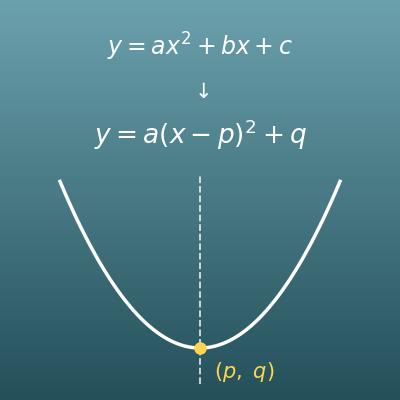
Completing the Square Calculator (Vertex, Axis of Symmetry, Max and Min)
Complete the square on y=ax²+bx+c to get vertex form, the vertex, the axis of symmetry and the max or min, with steps and a graph
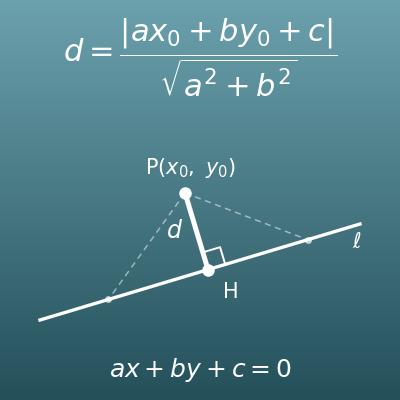
Distance from a Point to a Line Calculator (Foot of the Perpendicular and Parallel Lines)
Find the distance d = |ax₀+by₀+c|/√(a²+b²) from a point to a line as an exact value, with steps and a figure
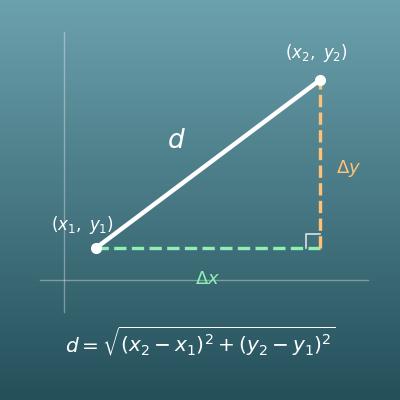
Distance Between Two Points Calculator (Distance Formula, Slope and Equation of the Line)
Find the length of the segment between two points and the equation of the line through them
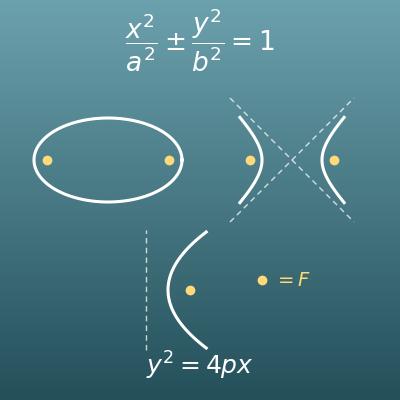
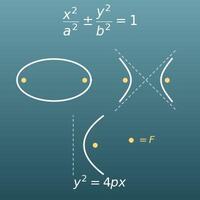
Conic Sections Calculator (Foci, Directrix and Eccentricity of Ellipses, Hyperbolas and Parabolas)
Find the foci, vertices and eccentricity of an ellipse, hyperbola or parabola, with steps such as c²=a²−b², exact values and a graph