Of the three values in "y = log_a(x)" (base a, argument x and log value y), enter the two you know and press "Calculate". The one left blank is calculated. The equation below is linked to the fields, so you can also type the base, argument or log value right into it.
Table of Contents
-
What you can do on this page
-
What is this calculation used for?
-
How to Use
-
Formula
-
Definition of a logarithm (what \(y = \log_a x\) says)
-
Finding the log value (change of base formula)
-
Finding the base (from the argument and the log value)
-
Product rule (the log of a product is a sum)
-
Quotient rule (the log of a quotient is a difference)
-
Power rule (the exponent moves to the front)
-
-
Symbols and terms
-
Good to know before you start
-
How to calculate it in Excel
-
How to calculate it in Google Sheets
-
How to calculate it in Python
-
How to write it in LaTeX and other math languages (copy and paste)
-
How to have ChatGPT do the calculation
-
DataChef Features
-
Related Features
-
NumberChef Calculators List
What you can do on this page
- For the logarithm \(y = \log_a x\), enter the two you know out of the base \(a\), the argument \(x\) and the log value \(y\), and the third appears on the spot
- You can use any base. Enter "10" as the base for the common logarithm, or "e" for the natural logarithm (\(\ln\))
- Besides log values like \(\log_2 8 = 3\), it also answers "what is 2 to the 10th power?" (solve for the argument, \(2^{10} = 1024\)) and "what number to the 4th power is 81?" (solve for the base)
- A plain-language explanation of the formulas and copy-and-paste formulas for Excel, Google Sheets and Python are all on this page
What is this calculation used for?
The decibel, the unit of loudness, is defined with the common logarithm of a ratio of sound energies. Even when the energy becomes 100 times larger, the level rises by only \(10 \times \log_{10} 100 = 20\) dB.
Our ears sense sound by "how many times louder", so a logarithmic unit fits them perfectly. Safe listening levels for earbuds and workplace noise guidelines (NIOSH recommends no more than 8 hours a day at 85 dB) are all built on this logarithm formula.
Magnitude is based on the logarithm of an earthquake's energy. One step up in magnitude releases about 32 times (\(10^{1.5}\) times) the energy, so a magnitude 7 earthquake has about 1000 times the energy of a magnitude 5.
Knowing logarithms lets you read this as "3 more digits of energy", not "only 2 more", and that directly shapes how you prepare for disasters.
pH, which measures how acidic a solution is, is defined with the common logarithm of the hydrogen ion concentration (\(\mathrm{pH} = -\log_{10}[\mathrm{H}^+]\)). Between lemon juice at pH 2 and water at pH 7, the concentration differs not by "5" but by a factor of \(10^5\) (100,000).
Turning quantities that span many powers of ten into easy numbers from about 0 to 14 is what logarithms do best. The pH numbers on cleaners, pool test kits and garden soil tests all rely on it.
At 3% interest compounded yearly, your money doubles when \(1.03^y = 2\), so \(y = \log_{1.03} 2 \approx 23.4\) years (assuming the same return every year).
The well-known "rule of 72" (72 ÷ interest rate in % ≈ years to double) is actually an approximation of this logarithm. It is a solid base for long-term money plans such as college savings and retirement, with numbers instead of guesses.
The number of bits needed to tell \(n\) different things apart is \(\log_2 n\). For example, 256 different values fit in \(\log_2 256 = 8\) bits (1 byte).
Password strength (roughly how many guesses a brute-force attack needs) is also measured as "how many bits", a logarithm. This calculation supports the whole digital world.
Neighboring piano keys (a half step) all have the same frequency ratio, \(2^{1/12} \approx 1.0595\) (equal temperament). If the frequency ratio of two notes is \(r\), the number of half steps between them is \(12 \times \log_2 r\).
For the A at 440 Hz and the A at 880 Hz, that is \(12 \times \log_2 2 = 12\) half steps, exactly one octave. Instrument tuners and pitch shifting in music software run on this logarithm.
Formula
Symbols and terms
Symbols
| \(\log_a x\) | log base a of x | "The logarithm of \(x\) with base \(a\)". The number that tells what power of the base \(a\) gives the argument \(x\). (Example - \(\log_2 8 = 3\)) |
| \(a\) | a (the base) | The number the logarithm is built on, written small below the line in \(\log_a x\). It must be greater than 0 and not 1. |
| \(x\) | x (the argument) | The number inside the log. It must be greater than 0 (the domain). |
| \(y\) | y (the log value) | The result of the logarithm. It is the exponent itself: "the base to the power \(y\) gives the argument". |
| \(\log_{10} x\) | log base 10 of x (common log) | The logarithm with base 10. It is tied directly to the number of digits (\(\log_{10} 1000 = 3\)) and is widely used in science and engineering. Often the base is left out and it is written \(\log x\). |
| \(\ln x\) | natural log of x | The logarithm with base \(e\) (Euler's number). It works best with calculus and is standard in math, physics and finance. |
| \(e\) | e (Euler's number) | A special number, about 2.71828…, whose digits go on forever. It is the base of the natural logarithm. On this calculator, enter "e" in the base field to use it. |
| \(M,\ N\) | M, N | Arguments used to explain the log rules (product, quotient and power). Both are greater than 0. |
| \(\sqrt[n]{x}\) | the nth root of x | The number whose \(n\)th power is \(x\). It is the same as \(x^{1/n}\) (the power 1 over \(n\)). (Example - \(\sqrt[4]{81} = 3\)) |
Terms
| logarithm (log) | The number that tells what power of the base gives the argument. It is the reverse of a power and is taught in Algebra 2. The symbol log is short for logarithm. |
| base | The number the logarithm is built on. In \(\log_2 8\), the base is 2. Only numbers greater than 0 and not equal to 1 can be a base. |
| argument | The number inside the log. In \(\log_2 8\), the argument is 8. Only numbers greater than 0 can be an argument. |
| domain | The set of numbers a logarithm accepts. The argument must be greater than 0, because any power of a positive number is always positive, so there is no log of 0 or of a negative number. It is the first thing to check when you solve equations or inequalities with logarithms. |
| base restrictions | The rule that the base must be greater than 0 and not equal to 1. Any power of 1 is still 1, so the logarithm would not be defined, and powers of 0 or of a negative number are not defined for every exponent. |
| common logarithm (common log) | The logarithm with base 10. It is tied directly to the number of digits, and most logarithms in everyday life, such as pH, decibels and earthquake magnitude, are common logarithms. |
| natural logarithm (natural log) | The logarithm with base \(e\) (about 2.718). Its symbol is \(\ln\). It is the easiest logarithm to use in calculus and is used for interest calculations and for studying natural processes. |
| Euler's number | The number \(e = 2.71828\ldots\), whose digits go on forever. It appears naturally whenever there is continuous growth. Like \(\pi\), it is a famous irrational number. |
| power | Multiplying the same number by itself several times. As in \(2^3 = 2 \times 2 \times 2\), the small number at the upper right (the exponent) tells how many times. A logarithm is the reverse of a power. |
| exponent | The small number at the upper right of a power that tells what power to raise to. In \(2^3\), the exponent is 3. A log value is the exponent you are looking for. |
| change of base formula | The formula that rewrites a logarithm with any base as "log of the argument ÷ log of the base". Even if a calculator or program has only \(\ln\) and \(\log_{10}\), this formula lets you calculate a logarithm with any base. |
| root (nth root) | The number whose \(n\)th power is the given number. As in "the number whose 4th power is 81 is 3", solving for the base is finding this root. |
Good to know before you start
Here is what helps you use the calculation on this page with real understanding, not just by pressing the button.
If you get stuck, going back to these topics is the fastest way forward.
| Powers and exponents (Grade 6) |
|
| Extending exponents (Grade 8 and Algebra 2) |
|
| Square roots and nth roots (Grade 8 to Algebra 2) |
|
| The idea of inverse operations (elementary and middle school) |
|
How to calculate it in Excel
| Argument x | 100 |
| Base a | 10 |
| Log value y | =LOG(B1,B2) |
| Base a | 2 |
| Log value y | 10 |
| Argument x | =B1^B2 |
| Argument x | 81 |
| Log value y | 4 |
| Base a | =B1^(1/B2) |
| Argument M | 4 |
| Argument N | 25 |
| log M + log N (base 10) | =LOG(B1,10)+LOG(B2,10) |
| log of the product M×N (base 10) | =LOG(B1*B2,10) |
| Argument M | 1000 |
| Argument N | 10 |
| log M − log N (base 10) | =LOG(B1,10)-LOG(B2,10) |
| log of the quotient M÷N (base 10) | =LOG(B1/B2,10) |
| Argument M | 2 |
| Exponent k | 10 |
| k × (log M) (base 10) | =B2*LOG(B1,10) |
| log of the power M^k (base 10) | =LOG(B1^B2,10) |
The Excel LOG function is written as "=LOG(number, base)" (if you leave out the base, it uses the common logarithm, base 10). The natural logarithm (base e) is "=LN(number)".
In the first table, for example, B3 shows 2 (because 10 to the 2nd power is 100). To calculate a natural logarithm, change B3 in the first table to "=LN(B1)".
The fourth to sixth tables check the log rules. The two formulas at the bottom always give the same value.
How to calculate it in Google Sheets
| Argument x | 100 |
| Base a | 10 |
| Log value y | =LOG(B1,B2) |
| Base a | 2 |
| Log value y | 10 |
| Argument x | =B1^B2 |
| Argument x | 81 |
| Log value y | 4 |
| Base a | =B1^(1/B2) |
| Argument M | 4 |
| Argument N | 25 |
| log M + log N (base 10) | =LOG(B1,10)+LOG(B2,10) |
| log of the product M×N (base 10) | =LOG(B1*B2,10) |
| Argument M | 1000 |
| Argument N | 10 |
| log M − log N (base 10) | =LOG(B1,10)-LOG(B2,10) |
| log of the quotient M÷N (base 10) | =LOG(B1/B2,10) |
| Argument M | 2 |
| Exponent k | 10 |
| k × (log M) (base 10) | =B2*LOG(B1,10) |
| log of the power M^k (base 10) | =LOG(B1^B2,10) |
Copy the whole table, paste it into cell A1, and replace the input numbers with your own.
How to calculate it in Python
import math

x = 100   # argument (a number greater than 0)
a = 10    # base (greater than 0 and not 1; use math.e for the natural log)

y = math.log(x, a)   # log value y = log_a(x)
print(f"Log of {x} with base {a}: {y}")

# The common log (base 10) and natural log (base e) also have their own functions
print(f"Common log log10({x}) = {math.log10(x)}")
print(f"Natural log ln({x}) = {math.log(x)}")

# You can also work backward
true_number = a ** y        # find the argument (raise the base to the power y)
base_number = x ** (1 / y)  # find the base (raise the argument to the power 1/y)
print(f"Argument: {true_number}, base: {base_number}")
How to write it in LaTeX and other math languages (copy and paste)
y = logₐ x ⇔ x = aʸ
y = \log_{a} x \iff x = a^{y}
<math xmlns="http://www.w3.org/1998/Math/MathML" display="block">
<mrow>
<mi>y</mi>
<mo>=</mo>
<msub><mi>log</mi><mi>a</mi></msub>
<mi>x</mi>
<mo>⇔</mo>
<mi>x</mi>
<mo>=</mo>
<msup><mi>a</mi><mi>y</mi></msup>
</mrow>
</math>
y = log_a x iff x = a^y
Log[a, x]
y := log[a](x);
y = log(x)/log(a);
y = log_a(x)
logₐ x = ln x ÷ ln a
\log_{a} x = \dfrac{\ln x}{\ln a}
<math xmlns="http://www.w3.org/1998/Math/MathML" display="block">
<mrow>
<msub><mi>log</mi><mi>a</mi></msub>
<mi>x</mi>
<mo>=</mo>
<mfrac>
<mrow><mi>ln</mi><mo>⁡</mo><mi>x</mi></mrow>
<mrow><mi>ln</mi><mo>⁡</mo><mi>a</mi></mrow>
</mfrac>
</mrow>
</math>
log_a x = (ln x)/(ln a)
Log[x]/Log[a]
y := ln(x)/ln(a);
y = log(x)/log(a);
log_a(x) = ln(x)/ln(a)
a = x^{1/y}
<math xmlns="http://www.w3.org/1998/Math/MathML" display="block">
  <mrow>
    <mi>a</mi>
    <mo>=</mo>
    <msup>
      <mi>x</mi>
      <mrow><mn>1</mn><mo>/</mo><mi>y</mi></mrow>
    </msup>
  </mrow>
</math>
a = x^(1/y)
x^(1/y)
a := x^(1/y);
a = x^(1/y);
a = x^(1/y)
logₐ(MN) = logₐ M + logₐ N
\log_{a} MN = \log_{a} M + \log_{a} N
<math xmlns="http://www.w3.org/1998/Math/MathML" display="block">
  <mrow>
    <msub><mi>log</mi><mi>a</mi></msub>
    <mrow><mi>M</mi><mi>N</mi></mrow>
    <mo>=</mo>
    <msub><mi>log</mi><mi>a</mi></msub>
    <mi>M</mi>
    <mo>+</mo>
    <msub><mi>log</mi><mi>a</mi></msub>
    <mi>N</mi>
  </mrow>
</math>
log_a (MN) = log_a M + log_a N
Log[a, M*n] == Log[a, M] + Log[a, n] (* N (numerical evaluation) is a reserved word in Mathematica, so n is used instead *)
log[a](M*N) = log[a](M) + log[a](N);
log(M*N)/log(a) == log(M)/log(a) + log(N)/log(a)
log_a(MN) = log_a(M) + log_a(N)
logₐ(M ÷ N) = logₐ M − logₐ N
\log_{a} \dfrac{M}{N} = \log_{a} M - \log_{a} N
<math xmlns="http://www.w3.org/1998/Math/MathML" display="block">
<mrow>
<msub><mi>log</mi><mi>a</mi></msub>
<mfrac><mi>M</mi><mi>N</mi></mfrac>
<mo>=</mo>
<msub><mi>log</mi><mi>a</mi></msub>
<mi>M</mi>
<mo>−</mo>
<msub><mi>log</mi><mi>a</mi></msub>
<mi>N</mi>
</mrow>
</math>
log_a (M/N) = log_a M - log_a N
Log[a, M/n] == Log[a, M] - Log[a, n] (* N (numerical evaluation) is a reserved word in Mathematica, so n is used instead *)
log[a](M/N) = log[a](M) - log[a](N);
log(M/N)/log(a) == log(M)/log(a) - log(N)/log(a)
log_a(M/N) = log_a(M) - log_a(N)
logₐ(Mᵏ) = k logₐ M
\log_{a} M^{k} = k \log_{a} M
<math xmlns="http://www.w3.org/1998/Math/MathML" display="block">
  <mrow>
    <msub><mi>log</mi><mi>a</mi></msub>
    <msup><mi>M</mi><mi>k</mi></msup>
    <mo>=</mo>
    <mi>k</mi>
    <msub><mi>log</mi><mi>a</mi></msub>
    <mi>M</mi>
  </mrow>
</math>
log_a (M^k) = k log_a M
Log[a, M^k] == k*Log[a, M]
log[a](M^k) = k*log[a](M);
log(M^k)/log(a) == k*log(M)/log(a)
log_a(M^k) = k log_a(M)
How to have ChatGPT do the calculation
You are a calculation assistant for logarithms. Do the following calculations by actually running Python code, and base your answer only on the numbers from the execution result (do not answer by mental math or guessing).

Find each of the following:
1. The log of 100 with base 10 (log10(100))
2. The natural log of 7 (ln 7)
3. The argument when the base is 2 and the log value is 10 (2 to the 10th power)
4. The number whose 4th power is 81 (the base when the argument is 81 and the log value is 4)

Show the formulas you used and the numbers from the execution result.
How to Use
-
1Enter your numbersType the numbers you want to calculate with into the input fields
-
2CalculatePress the "Calculate" button
-
3Check the resultThe result appears on the spot. The same page also explains the idea behind the calculation and the formula
DataChef Features

No technical knowledge required.
Intuitive and user-friendly operation.

Can be used without registering personal information.

Automatic file deletion by clicking "download".

and rapid file conversion.

No attribution required.

No need to contact us for commercial use permission.
Related Features
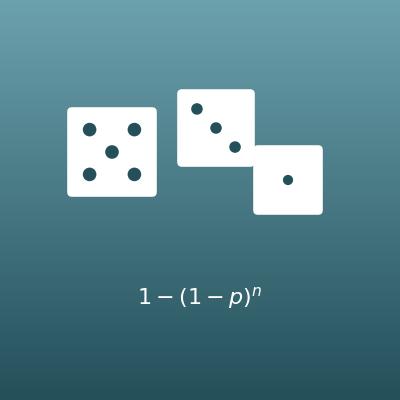
Probability of Repeated Trials (n in a Row, At Least Once)
Finds the chance of n in a row and of at least once in n tries (a classic use of powers)
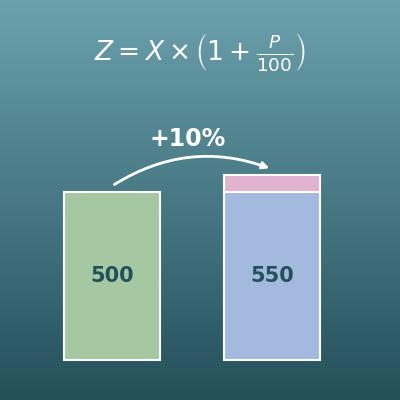
Percentage Change Calculator (Increase and Decrease)
Finds the original value, the percent change or the new value from the other two
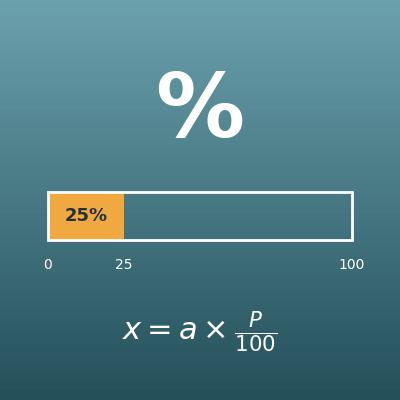
Percentage Calculator (Percent, Part and Whole)
Finds the percent, the part or the whole from the other two
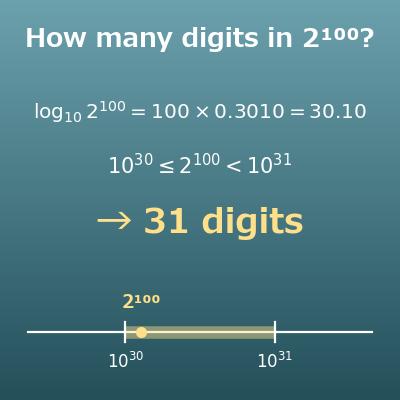
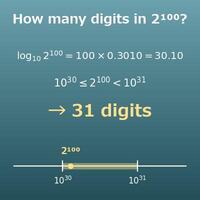
Number of Digits Calculator (How Many Digits in 2^100? Leading Digit)
Finds how many digits a power has and its leading digit, both by hand with log₁₀ 2 ≈ 0.3010 and by exact calculation