First choose the "Type of calculation", fill in the fields shown and press "Calculate". It calculates the churn rate, retention rate, average lifetime, annual churn and more, and graphs how customers drop month by month.
Table of Contents
-
What you can do on this page
-
What is this calculation used for?
-
How to Use
-
Formulas and figures
-
Formula for the monthly churn rate
-
Formula for the average customer lifetime (months)
-
Formula for the annual churn rate (from the monthly rate)
-
Formula for the monthly churn rate (from the annual rate)
-
Formula for the customers left after n months
-
Formula for the max monthly churn rate (from a target average lifetime)
-
-
Symbols and terms
-
Good to know before you start
-
How to calculate it in Excel
-
How to calculate it in Google Sheets
-
How to calculate it in Python
-
How to write it in LaTeX and other math languages (copy and paste)
-
How to have ChatGPT do the calculation
-
DataChef Features
-
Related Features
-
NumberChef Calculators List
What you can do on this page
- Calculates the monthly churn rate and retention rate from the customers at the start of the month and the cancellations during it. New customers added during the period are never counted in the denominator, and the result also shows how another definition (using the average of start and end as the denominator) differs
- From the monthly churn rate, it finds the average customer lifetime (\(100 \div\) churn rate months) and the annual churn rate. The numbers show why "5% a month times 12 = 60% a year" is wrong
- It also works backward: "What is 40% annual churn per month?", "How low must monthly churn be for customers to stay 24 months on average?" and "If 200 customers churn at 5% a month, how many are left after 12 months?"
- A decay graph shows customers dropping month by month, and marks where the average customer lifetime falls
- A plain-language explanation of the formulas and copy-and-paste formulas for Excel, Google Sheets and Python are all on this page
What is this calculation used for?
For a monthly subscription service, the basic routine is to work out the churn rate every month from the customers at the start of the month and the cancellations. With 1,200 at the start and 36 cancellations, it is \(36 \div 1200 \times 100 = 3\)%, and the average lifetime is about \(100 \div 3 \approx 33\) months.
No matter how many new customers you add, if churn stays high, new customers mostly just replace the ones you lose. Tracking "the rate went up or down since last month" gives you numbers for decisions on pricing, product improvements and customer support.
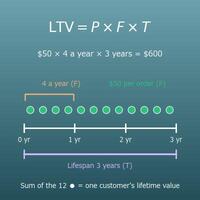
LTV, "how much revenue one customer brings", is estimated for a subscription as "monthly price × average lifetime in months" (for gross profit, also multiply by the gross margin). At a 5% monthly churn rate, the average lifetime is 20 months, so for a $30/month plan the LTV is about $600.
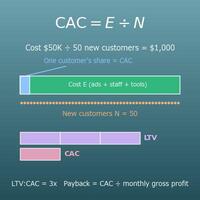
With this estimate, you can decide how much you can spend on ads to win one customer. The churn rate is the starting point of that calculation, and the relation "less churn, higher LTV" also comes from the average lifetime being the reciprocal of the churn rate.
In businesses such as gyms and classes, where people talk about "how many members leave in a year", you need to convert between annual and monthly rates. 40% a year is \((1 - \sqrt[12]{0.6}) \times 100 \approx 4.17\)% a month, which is not the same as 3.33% from simply dividing by 12.
Going the other way, when you put monthly figures into an annual plan, use the share left after 1 year, not "times 12". 5% a month is about 46% a year, very different from 60%, so the way you convert changes how the business looks.
"If we have 200 customers now and they cancel at 5% a month, how many are left in a year?" The forecast is \(200 \times 0.95^{12} \approx 108\). Without new customers, you would lose almost half your customers in a year, and the numbers make that visible.
With this forecast you can plan next year's revenue, the size of the support team, and the new customers needed (about 92 new customers a year just to make up for the losses).
You can never stop all cancellations, so in practice you set a churn target by working back from "how many months do customers need to stay on average for the business to pay off". If you need 24 months on average, the max monthly churn rate is \(100 \div 24 \approx 4.17\)%.
With the target as a number, results turn into concrete action, such as "this month was 4.5%, so we need to improve". The basis is a simple formula, "the reciprocal of the churn rate = average lifetime", which also makes it easy to share with the team.
Formulas and figures
Symbols and terms
Symbols
| \(c\) | see | Monthly churn rate (%), from the first letter of "churn" (customers leaving). The share of customers who cancel during one month. In the reverse formula, it is the highest churn rate you can allow. |
| \(r\) | ar | Monthly retention rate (%), from the first letter of "retention". The share of customers still subscribed after 1 month: \(r = 100 - c\). |
| \(N_{0}\) | N sub zero (N naught) | Customers at the start (of the month). \(N\) is the first letter of "number", and the subscript \(0\) stands for month 0, the starting point. (Example - with 200 at the start of the month, \(N_{0} = 200\)) |
| \(D\) | dee | Cancellations during the period (one month): how many of the customers at the start canceled that month. There is no standard one-letter symbol, so this page uses \(D\), for "drop-offs". |
| \(L\) | el | Average lifetime in months, from the first letter of "lifetime". How many months one customer stays subscribed on average: \(L = 100 \div c\). In the reverse formula, it is the target average lifetime. |
| \(c_{\mathrm{y}}\) | C sub y | Annual churn rate (%). The subscript \(\mathrm{y}\) is the first letter of "year". The share of customers who cancel during one year. |
| \(R_{\mathrm{y}}\) | R sub y | Share left after 1 year (as a decimal). \(R\) for retention with \(\mathrm{y}\) for year: \(R_{\mathrm{y}} = (1 - c \div 100)^{12}\). Times 100, it is the annual retention rate (%). |
| \(N_{n}\) | N sub n | Customers left after \(n\) months. The subscript \(n\) is the number of months elapsed; it is the count after starting from \(N_{0}\) and shrinking month by month. |
| \(n\) | en | Months elapsed, from the first letter of "number". A whole number for "how many months later". In the formula, it is how many times you multiply by the share left after 1 month (the exponent). |
| \(\sqrt[12]{\ }\) | twelfth root | The 12th root. The symbol for the number that gives this number when multiplied by itself 12 times. Used to get the monthly share left from the yearly share left. |
| \(100\) | one hundred | The base for percentages. Divide a percentage by 100 to get back a decimal (\(5\% \div 100 = 0.05\)). This conversion is also why the reciprocal of the churn rate, \(100 \div c\), is the average lifetime in months. |
Terms
| churn rate | The share of customers who cancel in a given period (one month on this page). The word comes from "churn", to stir, describing customers turning over. On this page it is defined as cancellations during the period divided by customers at the start. In subscriptions and SaaS it is one of the most important metrics, because it directly decides how fast revenue shrinks. |
| retention rate | The share of customers at the start who are still subscribed at the end. Added to the churn rate, it makes exactly 100% (retention rate = 100 − churn rate). For apps, retention for a set number of days, such as "day-1 retention" or "day-30 retention", is common. |
| customer churn | Churn counted by the number of customers (accounts), also called logo churn. This is the churn rate on this page. When a report just says "churn rate", check whether it is based on customers or on revenue (revenue churn). |
| revenue churn | Churn measured as the share of monthly recurring revenue (MRR) lost to cancellations and downgrades, also called MRR churn. When customers on expensive plans leave, it comes out larger than customer churn. When a report just says "churn rate", check whether it is based on customers or on revenue. |
| start of the period | The beginning of the period you measure. For monthly figures, the start of the month. The denominator of the churn rate is the customers at the start of the period. |
| end of the period | The end of the period you measure. For monthly figures, the end of the month. Customers at the end = start − cancellations + new. |
| churn rate using the average customers | Another definition of the churn rate that uses the average of the start and end counts as the denominator. In a growth phase with many new customers, the denominator gets bigger, so it comes out smaller than the value based on the start count. Neither is "right"; they are different counting rules, so match the definitions before comparing. |
| average customer lifetime | How many months (or years) one customer stays subscribed on average. When customers cancel at a steady monthly churn rate, it is the reciprocal of the churn rate (100 ÷ churn rate). It is the basis for estimating LTV (customer lifetime value) as "monthly price × average lifetime in months". |
| annualizing | Converting a monthly rate into "what it comes to over a year". For something like churn, where each month's rate applies only to those still left, convert by "multiply the share left after 1 month 12 times and subtract from 1", not by multiplying by 12. It is the same idea as converting a monthly interest rate to an annual rate. |
| cohort | A group of people who started at the same time, such as "customers who signed up in the same month". Following each cohort month by month shows whether cancellations happen mostly right after sign-up or at a steady pace. The formula for customers left on this page shows one cohort shrinking. |
| reciprocal | The number that gives 1 when multiplied. The reciprocal of 5 is \(\dfrac{1}{5}\) (= 0.2). The reciprocal of a 5% churn rate (0.05 as a decimal) is \(1 \div 0.05 = 20\), the average lifetime in months (with the percentage as is, calculate 100 ÷ 5). |
| power (exponent) | Multiplying the same number by itself several times. \(0.95^{12}\) is 0.95 multiplied 12 times, the share left after 1 year built from 12 months of "share left after 1 month". |
| 12th root | The number that gives this number when multiplied by itself 12 times. \(\sqrt[12]{0.6} \approx 0.9583\) says "0.9583 multiplied 12 times is about 0.6". It undoes a power, and in Excel you write it as \(\wedge(1/12)\). |
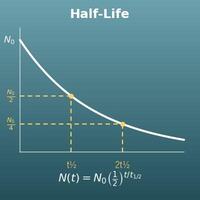
| exponential decay | A kind of decline where a fixed share of what is left disappears each period. The drop is largest at first and then gets smaller, so the graph is a downward curve. Radioactive half-life and how a drug's level in the blood falls have the same form. |
Good to know before you start
Here is what helps you use the calculation on this page with real understanding, not just by pressing the button.
If you get stuck, going back over these topics is the quickest way forward.
| Percents (Grades 6–7) |
|
| Reciprocals (Grade 6) |
|
| Exponents (Grade 8 and Algebra 1) |
|
| Roots and rational exponents (Algebra 2) |
|
| Compound interest (Algebra 2 and personal finance) |
|
How to calculate it in Excel
| Cancellations during the period D | 10 |
| Customers at the start N0 | 200 |
| Monthly churn rate c (%) | =B1/B2*100 |
| Monthly churn rate c (%) | 5 |
| Average lifetime L (months) | =100/B1 |
| Monthly churn rate c (%) | 5 |
| Share left after 1 year Ry | =(1-B1/100)^12 |
| Annual churn rate cy (%) | =(1-B2)*100 |
| Annual churn rate cy (%) | 40 |
| Monthly churn rate c (%) | =(1-(1-B1/100)^(1/12))*100 |
| Customers at the start N0 | 200 |
| Monthly churn rate c (%) | 5 |
| Months elapsed n | 12 |
| Customers left after n months Nn | =B1*(1-B2/100)^B3 |
| Target average lifetime L (months) | 24 |
| Max monthly churn rate c (%) | =100/B1 |
For example, B3 of the first table shows 5 (churn rate 5%), B2 of the second shows 20 (20 months on average), B3 of the third shows about 45.96 (annual 45.96%), B2 of the fourth shows about 4.17 (monthly 4.17%), B4 of the fifth shows about 108.07 (about 108 customers after 12 months), and B2 of the sixth shows about 4.17 (max churn rate 4.17%).
"^" is a power (how many times to multiply), and "^(1/12)" is the 12th root. Just replace the inputs with your own numbers.
How to calculate it in Google Sheets
| Cancellations during the period D | 10 |
| Customers at the start N0 | 200 |
| Monthly churn rate c (%) | =B1/B2*100 |
| Monthly churn rate c (%) | 5 |
| Average lifetime L (months) | =100/B1 |
| Monthly churn rate c (%) | 5 |
| Share left after 1 year Ry | =(1-B1/100)^12 |
| Annual churn rate cy (%) | =(1-B2)*100 |
| Annual churn rate cy (%) | 40 |
| Monthly churn rate c (%) | =(1-(1-B1/100)^(1/12))*100 |
| Customers at the start N0 | 200 |
| Monthly churn rate c (%) | 5 |
| Months elapsed n | 12 |
| Customers left after n months Nn | =B1*(1-B2/100)^B3 |
| Target average lifetime L (months) | 24 |
| Max monthly churn rate c (%) | =100/B1 |
How to calculate it in Python
customers_start = 200   # customers at the start (of the month)
churned = 10            # cancellations during the period

churn_rate = churned / customers_start * 100        # monthly churn rate (%)
retention_rate = 100 - churn_rate                   # monthly retention rate (%)
avg_months = 100 / churn_rate                       # average lifetime (months)
annual_retention = (1 - churn_rate / 100) ** 12     # share left after 1 year
annual_churn = (1 - annual_retention) * 100         # annual churn rate (%)

print(f"Monthly churn rate: {churn_rate}%")
print(f"Monthly retention rate: {retention_rate}%")
print(f"Average lifetime: {avg_months} months")
print(f"Annual churn rate: {annual_churn:.4f}% (simply times 12: {churn_rate * 12}%)")

# Reverse 1: monthly churn rate from an annual churn rate (12th root)
annual_rate = 40
monthly_from_annual = (1 - (1 - annual_rate / 100) ** (1 / 12)) * 100
print(f"Monthly churn rate for {annual_rate}% a year: {monthly_from_annual:.4f}%")

# Reverse 2: max monthly churn rate from a target average lifetime
target_months = 24
print(f"Monthly churn rate needed for {target_months} months on average: {100 / target_months:.4f}% or less")

# Reverse 3: customers left after n months
months = 12
remaining = customers_start * (1 - churn_rate / 100) ** months
print(f"Customers left after {months} months: {remaining:.2f}")
How to write it in LaTeX and other math languages (copy and paste)
c = D ÷ N₀ × 100
c = \dfrac{D}{N_{0}} \times 100
<math xmlns="http://www.w3.org/1998/Math/MathML" display="block">
<mrow>
<mi>c</mi>
<mo>=</mo>
<mfrac><mi>D</mi><msub><mi>N</mi><mn>0</mn></msub></mfrac>
<mo>×</mo>
<mn>100</mn>
</mrow>
</math>
c = D/N_0 xx 100
d/n0*100
c := d/n0*100;
c = d/n0*100;
c = D/N_0 × 100
L = 100 ÷ c
L = \dfrac{100}{c}
<math xmlns="http://www.w3.org/1998/Math/MathML" display="block">
  <mrow>
    <mi>L</mi>
    <mo>=</mo>
    <mfrac><mn>100</mn><mi>c</mi></mfrac>
  </mrow>
</math>
L = 100/c
100/c
L := 100/c;
L = 100/c;
L = 100/c
cy = (1 − (1 − c/100)¹²) × 100
c_{\mathrm{y}} = \left[1 - \left(1 - \dfrac{c}{100}\right)^{12}\right] \times 100
<math xmlns="http://www.w3.org/1998/Math/MathML" display="block">
<mrow>
<msub><mi>c</mi><mi mathvariant="normal">y</mi></msub>
<mo>=</mo>
<mrow>
<mo>[</mo>
<mn>1</mn><mo>−</mo>
<msup>
<mrow><mo>(</mo><mn>1</mn><mo>−</mo><mfrac><mi>c</mi><mn>100</mn></mfrac><mo>)</mo></mrow>
<mn>12</mn>
</msup>
<mo>]</mo>
</mrow>
<mo>×</mo>
<mn>100</mn>
</mrow>
</math>
c_y = (1 - (1 - c/100)^12) xx 100
(1 - (1 - c/100)^12)*100
cy := (1 - (1 - c/100)^12)*100;
cy = (1 - (1 - c/100)^12)*100;
c_y = (1 - (1 - c/100)^12) × 100
c = (1 − (1 − cy/100)^(1/12)) × 100
c = \left(1 - \sqrt[12]{1 - \dfrac{c_{\mathrm{y}}}{100}}\right) \times 100
<math xmlns="http://www.w3.org/1998/Math/MathML" display="block">
<mrow>
<mi>c</mi>
<mo>=</mo>
<mrow>
<mo>(</mo>
<mn>1</mn><mo>−</mo>
<mroot>
<mrow><mn>1</mn><mo>−</mo><mfrac><msub><mi>c</mi><mi mathvariant="normal">y</mi></msub><mn>100</mn></mfrac></mrow>
<mn>12</mn>
</mroot>
<mo>)</mo>
</mrow>
<mo>×</mo>
<mn>100</mn>
</mrow>
</math>
c = (1 - root(12)(1 - c_y/100)) xx 100
(1 - (1 - cy/100)^(1/12))*100
c := (1 - (1 - cy/100)^(1/12))*100;
c = (1 - (1 - cy/100)^(1/12))*100;
c = (1 - (1 - c_y/100)^(1/12)) × 100
Nₙ = N₀ × (1 − c/100)ⁿ
N_{n} = N_{0} \left(1 - \dfrac{c}{100}\right)^{n}
<math xmlns="http://www.w3.org/1998/Math/MathML" display="block">
<mrow>
<msub><mi>N</mi><mi>n</mi></msub>
<mo>=</mo>
<msub><mi>N</mi><mn>0</mn></msub>
<msup>
<mrow><mo>(</mo><mn>1</mn><mo>−</mo><mfrac><mi>c</mi><mn>100</mn></mfrac><mo>)</mo></mrow>
<mi>n</mi>
</msup>
</mrow>
</math>
N_n = N_0 (1 - c/100)^n
n0*(1 - c/100)^n
Nn := N0*(1 - c/100)^n;
Nn = N0*(1 - c/100)^n;
N_n = N_0 (1 - c/100)^n
c = 100 ÷ L
c = \dfrac{100}{L}
<math xmlns="http://www.w3.org/1998/Math/MathML" display="block">
  <mrow>
    <mi>c</mi>
    <mo>=</mo>
    <mfrac><mn>100</mn><mi>L</mi></mfrac>
  </mrow>
</math>
c = 100/L
100/l
c := 100/L;
c = 100/L;
c = 100/L
How to have ChatGPT do the calculation
You are a calculation assistant for subscription business metrics. Do the following calculation by actually running Python code, and base your answer only on the numbers from the execution result (do not answer by mental math or guessing).

There were 200 customers at the start of the month, and 10 of them canceled during the month (new customers are not included in the denominator).
Find each of the following:
1. Monthly churn rate (cancellations ÷ customers at the start × 100, as a %)
2. Monthly retention rate (100 − churn rate, as a %)
3. Average lifetime in months (100 ÷ churn rate)
4. Annual churn rate ((1 − (1 − churn rate/100)^12) × 100, as a %). Also show how it differs from simply multiplying by 12
5. A separate question: with an annual churn rate of 40%, the monthly churn rate ((1 − (1 − 40/100)^(1/12)) × 100, as a %)
6. A separate question: for an average lifetime of 24 months, the max monthly churn rate (100 ÷ 24, as a %)
7. If 200 customers cancel at 5% a month, the customers left after 12 months (200 × (1 − 5/100)^12)

Show the formulas you used and the numbers from the execution result.
How to Use
-
1Enter your numbersType the numbers you want to calculate with into the input fields
-
2CalculatePress the "Calculate" button
-
3Check the resultThe result appears on the spot. The same page also explains the idea behind the calculation and the formula
DataChef Features

No technical knowledge required.
Intuitive and user-friendly operation.

Can be used without registering personal information.

Automatic file deletion by clicking "download".

and rapid file conversion.

No attribution required.

No need to contact us for commercial use permission.
Related Features
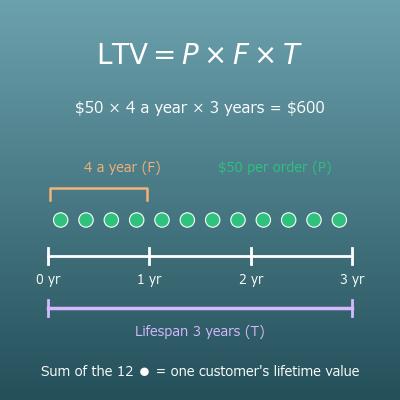
Customer Lifetime Value (LTV) Calculator for E-Commerce and Subscriptions
Enter the monthly churn rate from this page to get subscription LTV (monthly revenue per customer (ARPU) × gross margin ÷ churn rate) and work back from a target LTV
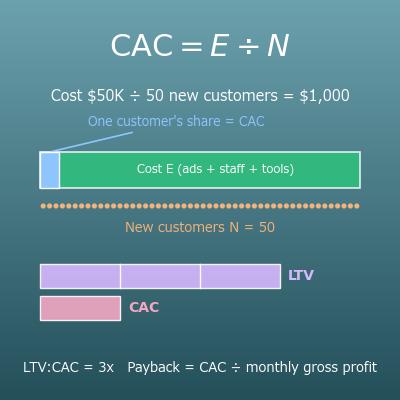
Customer Acquisition Cost (CAC) Calculator with LTV:CAC Ratio and Payback Period
Calculates the cost of winning one customer and compares it with LTV. Helps you decide between raising LTV by reducing churn and lowering acquisition cost
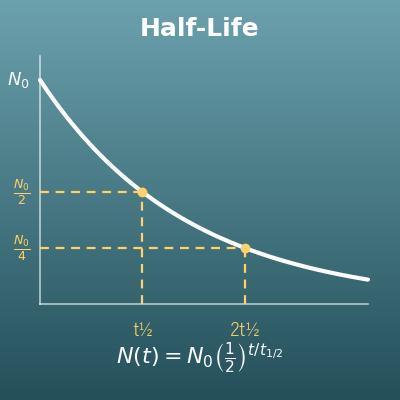
Half-Life Calculator (Initial Amount, Remaining Amount, Time, Half-Life)
Uses the same "shrinks by a fixed share each period" formula, but for how long it takes an amount of a substance, not customers, to halve. A cousin of the decay formula
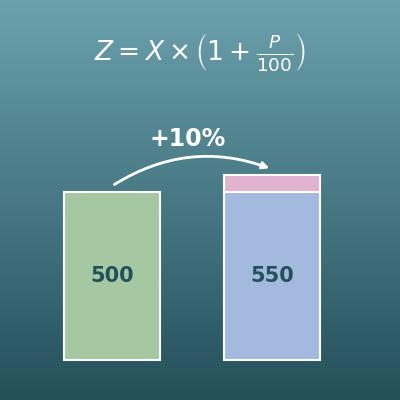
Percentage Change Calculator (Increase and Decrease)
For month-over-month questions like "by what % did customers go up or down since last month?". Churn rate is the share of people who cancel, a different metric