Bookmarks    
nPr and nCr    
Random Number    
SD Calculator    
Sample Size    
Percent Error    
Density    
Molarity    
Molar Mass    
Ohm's Law    
Watts to Amps    
Voltage Drop    
Long Division    
Mixed Numbers    
Rounding    
Nth Root    
Exponents    
Half-Life    
Polar Form    
De Moivre    
3D Distance    
Point to Line    
Cross Product    
Determinant    
Sin Cos Tan    
Triangle Area    
Scale Factor    
Sector Area    
Ellipse Area    
Cube Volume    
Box Volume    
Sphere Volume    
Cone Volume    
Pipe Volume    
Time Duration    
Time Card    
Present Value    
Future Value    
Churn Rate    
A/B Test Calc    
SEO Traffic    
Ideal Weight    
Fat Intake    
Child Height    
Golf Handicap    
Heat Index    
Wind Chill    
Dew Point    
Download Time    
kWh to Cost    
AC Size (BTU)    
Heating Costs    
LED Savings    
Trip Gas Cost    
Tire Size    
Solar Output    
Solar Payback    
Battery Size    
Wall Area    
Gravel Needed    
Mortar Mix    
Slope Grade    
Curtain Size    
Soil Needed    
Sod Needed    
Ramp Length    
Blind Size    
Drain Slope    
Board Feet    
Heat Loss    
Furniture Fit    
Moving Boxes    
Plywood Cuts    
Shelf Sag    
   Add
Probability and random number calculators
Independent Events
Independent Events
Two Events Solver
Two Events Solver
Repeated Trials
Repeated Trials
Bayes' Theorem
Bayes' Theorem
Expected Value
Expected Value
Binomial Distribution
nPr and nCr
nPr and nCr
Circular Permutation
With Repetition
With Repetition
Random Number
Random Number
Averages and statistics calculators
Average Calculator
Average Calculator
Mean Median Mode
Mean Median Mode
SD Calculator
SD Calculator
Quartiles & IQR
Quartiles & IQR
Frequency Table
Frequency Table
Correlation (r)
Correlation (r)
Normal Probability
Normal Probability
Z-Score Calculator
Z-Score Calculator
Confidence Interval
Confidence Interval
Sample Size
Sample Size
Mark & Recapture
Mark & Recapture
P-Value Calculator
P-Value Calculator
Percentage and ratio calculators
Percentage Calc
Percentage Calc
Percent Change
Percent Change
Percent Difference
Percent Difference
Percent Error
Percent Error
Ratio Calculator
Ratio Calculator
Discount Calculator
Discount Calculator
Sales Tax Calculator
Margin Calculator
Margin Calculator
Speed calculators
Speed Calculator
Speed Calculator
Density and concentration calculators
Density
Density
Molarity
Molarity
Molar Mass
Molar Mass
Physics and electricity calculators
Ohm's Law
Ohm's Law
Watts to Amps
Watts to Amps
Resistor Colors
Resistor Colors
Voltage Drop
Voltage Drop
Unit conversion calculators
Weight Converter
Weight Converter
Shoe Size Converter
Shoe Size Converter
Integer and signed number calculators
Long Division
Long Division
LCM Calculator
LCM Calculator
GCF Calculator
GCF Calculator
Integer Calculator
Integer Calculator
Prime Factorization
Prime Factorization
Diophantine Solver
Diophantine Solver
Modulo Calculator
Modulo Calculator
Factor Calculator
Factor Calculator
Roman Numerals
Roman Numerals
Fraction, decimal and rounding calculators
Fraction Calculator
Fraction Calculator
Mixed Numbers
Mixed Numbers
Simplify Fractions
Simplify Fractions
Fraction to Decimal
Fraction to Decimal
Decimal to Fraction
Decimal to Fraction
Rounding
Rounding
Equation and inequality calculators
Linear Equation
Linear Equation
Linear Systems
Linear Systems
Quadratic Formula
Quadratic Formula
Absolute Value
Absolute Value
Quadratic Inequality
Polynomial calculators
Binomial Theorem
Binomial Theorem
Square root and nth root calculators
Simplify Radicals
Simplify Radicals
Nth Root
Nth Root
Exponent and logarithm calculators
Exponents
Exponents
Log Calculator
Log Calculator
Number of Digits
Number of Digits
Scientific Notation
Scientific Notation
Sci. Notation Math
Sci. Notation Math
Half-Life
Half-Life
Complex number calculators
Complex Numbers
Complex Numbers
Polar Form
Polar Form
De Moivre
De Moivre
Function and graph calculators
Slope Calculator
Slope Calculator
Linear Function
Linear Function
Direct & Inverse Variation
y = ax² Calculator
y = ax² Calculator
Distance Formula
Distance Formula
3D Distance
3D Distance
Section Formula
Section Formula
Point to Line
Point to Line
Lat/Long Distance
Lat/Long Distance
Complete the Square
Complete the Square
Circle Equation
Circle Equation
Conic Sections
Conic Sections
Polar Coordinates
Polar Coordinates
Sequence calculators
Arithmetic Sequence
Arithmetic Sequence
Geometric Sequence
Geometric Sequence
Fibonacci Sequence
Fibonacci Sequence
Recurrence Relation
Recurrence Relation
Vector calculators
Vector Calculator
Vector Calculator
Cross Product
Cross Product
Matrix calculators
Matrix Calculator
Matrix Calculator
Determinant
Determinant
Inverse Matrix
Inverse Matrix
Plane geometry calculators
Sin Cos Tan
Sin Cos Tan
Degrees ⇔ Radians
Degrees ⇔ Radians
a sin θ + b cos θ
a sin θ + b cos θ
Triangle Solver
Triangle Solver
Triangle Area
Triangle Area
Right Triangle
Right Triangle
Pythagorean Theorem
Pythagorean Theorem
Polygon Angles
Polygon Angles
Scale Factor
Scale Factor
Parallel Lines
Parallel Lines
Rectangle Area
Rectangle Area
Parallelogram Area
Parallelogram Area
Trapezoid Area
Trapezoid Area
Circle Calculator
Circle Calculator
Sector Area
Sector Area
Inscribed Angle
Inscribed Angle
Ellipse Area
Ellipse Area
Solid geometry calculators
Cube Volume
Cube Volume
Cube Surface Area
Cube Surface Area
Box Volume
Box Volume
Box Surface Area
Box Surface Area
Cylinder Volume
Cylinder Volume
Cylinder Surface
Cylinder Surface
Sphere Volume
Sphere Volume
Sphere Surface
Sphere Surface
Spherical Cap Volume
Cap Surface Area
Cap Surface Area
Ellipsoid Volume
Ellipsoid Volume
Ellipsoid Surface
Ellipsoid Surface
Pyramid Volume
Pyramid Volume
Pyramid Surface
Pyramid Surface
Cone Volume
Cone Volume
Cone Surface Area
Cone Surface Area
Frustum Volume
Frustum Volume
Frustum Surface Area
Pipe Volume
Pipe Volume
Capsule Volume
Capsule Volume
Capsule Surface Area
Date and time calculators
Age Calculator
Age Calculator
Days Between Dates
Days Between Dates
Date Calculator
Date Calculator
Hours From Now
Hours From Now
Day of the Week
Day of the Week
Time Calculator
Time Calculator
Time Zone Converter
Time Zone Converter
Hours Calculator
Hours Calculator
Time Duration
Time Duration
Time Card
Time Card
Finance and economics calculators
Compound Interest
Compound Interest
Simple Interest
Simple Interest
Interest Calculator
Interest Calculator
TVM Calculator
TVM Calculator
Present Value
Present Value
Future Value
Future Value
ROI Calculator
ROI Calculator
IRR Calculator
IRR Calculator
Payback Period
Payback Period
Average Return
Average Return
GDP Calculator
GDP Calculator
Web marketing and ad metric calculators
CTR Calculator
CTR Calculator
Conversion Rate
Conversion Rate
CPC, CPM & CPA
CPC, CPM & CPA
ROAS Calculator
ROAS Calculator
Break-Even CPA
Break-Even CPA
LTV Calculator
LTV Calculator
CAC Calculator
CAC Calculator
Churn Rate
Churn Rate
A/B Test Calc
A/B Test Calc
A/B Sample Size
A/B Sample Size
SEO Traffic
SEO Traffic
Break-Even Point
Break-Even Point
Markup vs. Margin
Markup vs. Margin
CAGR Calculator
CAGR Calculator
Health and fitness calculators
BMI Calculator
BMI Calculator
Sleep Calculator
Sleep Calculator
Calorie Calculator
Calorie Calculator
BMR Calculator
BMR Calculator
TDEE Calculator
TDEE Calculator
Ideal Weight
Ideal Weight
Body Fat Calculator
Body Fat Calculator
Lean Body Mass
Lean Body Mass
Calories Burned
Calories Burned
Protein Intake
Protein Intake
Macro Calculator
Macro Calculator
Carb Calculator
Carb Calculator
Fat Intake
Fat Intake
Child Height
Child Height
Sports calculators
Golf Handicap
Golf Handicap
Pace Calculator
Pace Calculator
1RM Calculator
1RM Calculator
Target Heart Rate
Target Heart Rate
Weather calculators
Heat Index
Heat Index
Wind Chill
Wind Chill
Dew Point
Dew Point
Computer calculators
Base Converter
Base Converter
Subnet Calculator
Subnet Calculator
Download Time
Download Time
Household energy and budget calculators
Electricity Cost
Electricity Cost
kWh to Cost
kWh to Cost
Yearly kWh to Cost
Yearly kWh to Cost
AC Size (BTU)
AC Size (BTU)
AC Running Cost
AC Running Cost
Heating Costs
Heating Costs
Gas vs Electric
Gas vs Electric
LED Savings
LED Savings
Salary Calculator
Salary Calculator
Budget Calculator
Budget Calculator
Car calculators
Trip Gas Cost
Trip Gas Cost
EV Charging Cost
EV Charging Cost
EV vs Gas Cost
EV vs Gas Cost
MPG Calculator
MPG Calculator
Tire Size
Tire Size
Solar power and battery calculators
Solar Output
Solar Output
Solar Panel Count
Solar Panel Count
Solar Payback
Solar Payback
Battery Size
Battery Size
Home and DIY calculators
Tile Calculator
Tile Calculator
Stair Calculator
Stair Calculator
Concrete Volume
Concrete Volume
Wall Area
Wall Area
Wallpaper Rolls
Wallpaper Rolls
Paint Calculator
Paint Calculator
Flooring Needed
Flooring Needed
Exterior Walls
Exterior Walls
Gravel Needed
Gravel Needed
Mortar Mix
Mortar Mix
Slope Grade
Slope Grade
Lumber Cut List
Lumber Cut List
Lot Coverage/FAR
Lot Coverage/FAR
Sheet Vinyl Roll
Sheet Vinyl Roll
Insulation Needed
Insulation Needed
Curtain Size
Curtain Size
TV Size & Distance
TV Size & Distance
Soil Needed
Soil Needed
Sod Needed
Sod Needed
Block Calculator
Block Calculator
Brick Calculator
Brick Calculator
Deck Materials
Deck Materials
Ramp Length
Ramp Length
Pilot Hole Size
Pilot Hole Size
Room Ventilation
Room Ventilation
Paint Thinning
Paint Thinning
Baseboard & Trim
Baseboard & Trim
Blind Size
Blind Size
Picture Hanging
Picture Hanging
Drain Slope
Drain Slope
Screw Calculator
Screw Calculator
Board Feet
Board Feet
Fence Calculator
Fence Calculator
Wood Shrinkage
Wood Shrinkage
Caulk Calculator
Caulk Calculator
Heat Loss
Heat Loss
Furniture Fit
Furniture Fit
Moving Boxes
Moving Boxes
Storage Capacity
Storage Capacity
Plywood Cuts
Plywood Cuts
Shelf Sag
Shelf Sag

CPC, CPM and CPA Calculator (Ad Cost Metrics and Budget from Target CPA)

For "From results", enter the ad spend and whichever of impressions, clicks and conversions you know. For "From targets", enter the target CPA, expected CVR and target conversions (and the expected CTR if you know it) to get the max CPC, clicks needed and budget needed.

Enter amounts in dollars and rates in % (for 2%, enter "2"). CPM is the cost per 1,000 impressions, and CPA is the cost per conversion. The band widths in the figure only illustrate the flow; they are not to scale.
Result and graph
Enter your ad results (or targets) in the fields on the left and press "Calculate". The costs and rates, and a figure of the flow from impressions to clicks to conversions, will appear here.

What you can do on this page

  • From ad spend, impressions, clicks and conversions (just the ones you know), get CPC (cost per click), CPM (cost per 1,000 impressions) and CPA (cost per acquisition), plus CTR (click-through rate) and CVR (conversion rate), all at once
  • "With a $50 target CPA and a 2% CVR, what is the most I can pay per click? What budget do I need for 20 conversions?" You can also work back from targets (max CPC, clicks needed and budget needed) on this page
  • The formulas that link the three costs, \(\mathrm{CPA} = \mathrm{CPC} \div \mathrm{CVR}\) and \(\mathrm{CPC} = \mathrm{CPM} \div 1000 \div \mathrm{CTR}\) (with CVR and CTR as decimals), are explained clearly, including why they work
  • One figure shows the flow from impressions to clicks to conversions, with the cost at each step
  • Explanations of the formulas and copy-and-paste formulas for Excel, Google Sheets and Python are all on this page
The definitions on this page are CPC = ad spend ÷ clicks, CPM = ad spend ÷ impressions × 1000 (per 1,000 impressions) and CPA = ad spend ÷ conversions (acquisition = conversion). Whether an "acquisition" is a purchase, a sign-up or a request for information depends on your own definition of a conversion. Enter amounts in dollars.

What is this calculation used for?

Knowing how many customers $2,000 a month in ads brought (small businesses)

If you spend $2,000 a month on ads for an online store or a class, and get 500 clicks and 20 sign-ups, the CPC is \(2000 \div 500 = 4\) dollars and the CPA is \(2000 \div 20 = 100\) dollars.
If the gross profit left from one sign-up is $160, spending $100 to keep $160 means the ads are worth continuing; if the gross profit is only $80, you lose more the more you advertise. Putting CPA next to gross profit is all it takes to decide.

Setting next month's budget and bids (managing ads)

"Next month we want 30 conversions, at up to $60 each, and our CVR has been 2.5%." Then the budget needed is \(60 \times 30 = 1800\) dollars, the max CPC is \(60 \times 0.025 = 1.50\) dollars and the clicks needed are \(30 \div 0.025 = 1200\).
People who manage ads do this every month to build a budget plan, and set their max CPC bids at $1.50 or less. If the expected CVR turns out wrong, so do the results, so it is normal to check the actual CVR mid-month and adjust the plan.

Comparing social media ads billed by CPM with pay-per-click search ads

Say a social media ad has a CPM of $8, a CTR of 0.8% and a CVR of 2%, and a search ad has a CPC of $2 and a CVR of 4%. The social ad's CPC is \(8 \div 1000 \div 0.008 = 1\) dollar and its CPA is \(1 \div 0.02 = 50\) dollars. The search ad's CPA is \(2 \div 0.04 = 50\) dollars.
Even for ads billed in different ways, converting to CPA with the linking formulas lets you compare what one conversion costs. In this example, the search ad costs twice as much per click, yet the CPA is the same (the rates are assumptions and vary a lot by platform and product).

Measuring the cost-effectiveness of direct mail the same way

If printing and mailing 10,000 postcards costs $4,000 and brings 20 inquiries, the cost per 1,000 pieces is \(4000 \div 10000 \times 1000 = 400\) dollars (the same idea as CPM) and the cost per inquiry is \(4000 \div 20 = 200\) dollars (the same idea as CPA).
"Cost per 1,000" and "cost per result" work just as well outside the internet: print ads, billboards, trade shows. Put them next to your online CPA to compare where to spend your money.

Finding the cost per applicant for job ads (HR and recruiting)

If you pay a job board $2,000, the job posting is viewed 8,000 times and you get 16 applications, the cost per application is \(2000 \div 16 = 125\) dollars and the cost per 1,000 views is \(2000 \div 8000 \times 1000 = 250\) dollars.
In recruiting these are called cost per applicant and cost per hire, but the calculation is the same as CPA. Line up the cost per applicant of several job boards to decide where to put your budget.

Looking at sponsored video deals in CPM terms (creators)

If a company pays a creator $6,000 for one sponsored video and the video gets 500,000 views, the company's cost per 1,000 views is \(6000 \div 500000 \times 1000 = 12\) dollars.
The company compares this number with the CPM of its own ads to see whether the fee is worth it, and creators can use their view counts to explain a rough basis for their rates. Views are not the same as the number of people who actually watched, so treat the number as a guide.

Formulas and figures

Formula for the cost per click (CPC)
Figure
Standard notation (the usual math form)
\(\mathrm{CPC}\) \(=\) \(\mathrm{Cost}\) \(\div\) \(\mathrm{Clicks}\)
In words (symbols replaced with words)
③ \(\mathrm{CPC}\): cost per click \(=\) ① \(\mathrm{Cost}\): ad spend \(\div\) ② \(\mathrm{Clicks}\): clicks
The formula in words
① Divide the \(\mathrm{Cost}\): ad spend
② by the \(\mathrm{Clicks}\): clicks
③ and you get the \(\mathrm{CPC}\): cost per click (what you paid for each click)
Quick example
If $120 in ad spend brought 40 clicks, the cost per click is
\(\mathrm{CPC}\): cost per click \(=\) ad spend ($120) \(\div\) clicks (40)
\(120 \div 40 = 3\)
Key idea
CPC stands for cost per click. It is how much you paid on average each time your ad was clicked, the most basic cost measure for search ads and social media ads. The "Avg. CPC" in ad platforms such as Google Ads uses the same definition (cost ÷ clicks). The "max CPC" bid you set is a limit on how much you are willing to pay for one click, which is different from the CPC, the average you actually paid.
Formula for the cost per 1,000 impressions (CPM)
Figure
Standard notation (the usual math form)
\(\mathrm{CPM}\) \(=\) \(\mathrm{Cost}\) \(\div\) \(\mathrm{Imp}\) \(\times\) \(1000\)
In words (symbols replaced with words)
④ \(\mathrm{CPM}\): cost per 1,000 impressions \(=\) ① \(\mathrm{Cost}\): ad spend \(\div\) ② \(\mathrm{Imp}\): impressions \(\times\) ③ \(1000\): per 1,000 impressions
The formula in words
① Divide the \(\mathrm{Cost}\): ad spend
② by the \(\mathrm{Imp}\): impressions to get the cost per impression,
③ multiply by \(1000\): per 1,000 impressions to scale it up to 1,000 impressions,
④ and you get the \(\mathrm{CPM}\): cost per 1,000 impressions
Quick example
If $120 in ad spend brought 20,000 impressions, the cost per 1,000 impressions is
\(\mathrm{CPM}\): cost per 1,000 impressions \(=\) ad spend ($120) \(\div\) impressions (20,000) \(\times\) per 1,000 (1000)
\(120 \div 20000 = 0.006\)
\(0.006 \times 1000 = 6\)
Key idea
CPM stands for cost per mille, and "mille" is Latin for 1,000. Note that it is the cost per 1,000 impressions, not per impression. In the example, one impression costs $0.006, too small to work with, so by convention it is expressed per 1,000 impressions as $6. Display ads and video ads are often billed per 1,000 impressions (CPM bidding), whether or not anyone clicks. Even then, the actual CPM is found with the same formula (cost ÷ impressions × 1000). "vCPM" (viewable CPM), which counts only impressions that could actually be seen on screen, is a different measure whose denominator is viewable impressions.
Formula for the cost per acquisition (CPA)
Figure
Standard notation (the usual math form)
\(\mathrm{CPA}\) \(=\) \(\mathrm{Cost}\) \(\div\) \(\mathrm{CV}\)
In words (symbols replaced with words)
③ \(\mathrm{CPA}\): cost per acquisition \(=\) ① \(\mathrm{Cost}\): ad spend \(\div\) ② \(\mathrm{CV}\): conversions
The formula in words
① Divide the \(\mathrm{Cost}\): ad spend
② by the \(\mathrm{CV}\): conversions
③ and you get the \(\mathrm{CPA}\): cost per acquisition (what you paid for each conversion)
Quick example
If $120 in ad spend brought 4 conversions (purchases), the cost per acquisition is
\(\mathrm{CPA}\): cost per acquisition \(=\) ad spend ($120) \(\div\) conversions (4)
\(120 \div 4 = 30\)
Key idea
CPA stands for cost per acquisition, sometimes also called cost per action. Whatever the name, the formula is the same: how much one acquisition, that is, one conversion, cost. What matters is deciding for yourself what counts as one conversion and keeping it fixed: a purchase for an online store, an inquiry for real estate, an account sign-up for an app, and so on. Depending on the kind of conversion, it may also be called CPO (cost per order), CPL (cost per lead) or CPI (cost per install), but the calculation is always this formula.
Formulas for the click-through rate (CTR) and the conversion rate (CVR)
Standard notation (the usual math form)
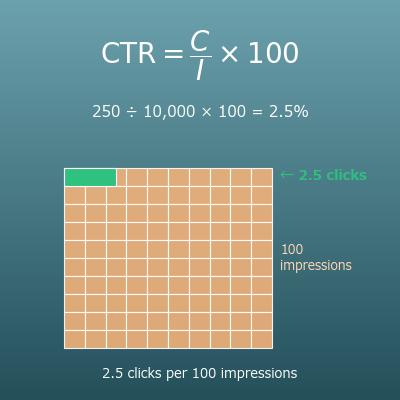
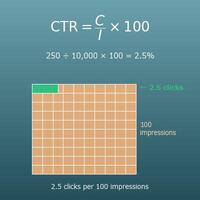
\(\mathrm{CTR}\) \(=\) \(\mathrm{Clicks}\) \(\div\) \(\mathrm{Imp}\) \(\times\) \(100\)
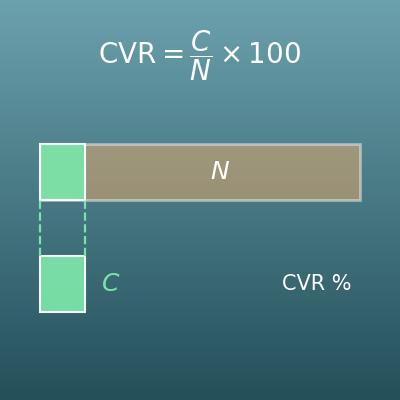
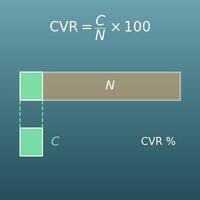
\(\mathrm{CVR}\) \(=\) \(\mathrm{CV}\) \(\div\) \(\mathrm{Clicks}\) \(\times\) \(100\)
In words (symbols replaced with words)
④ \(\mathrm{CTR}\): click-through rate (%) \(=\) ① \(\mathrm{Clicks}\): clicks \(\div\) ② \(\mathrm{Imp}\): impressions \(\times\) ③ \(100\): to make a percent
⑧ \(\mathrm{CVR}\): conversion rate (%) \(=\) ⑤ \(\mathrm{CV}\): conversions \(\div\) ⑥ \(\mathrm{Clicks}\): clicks \(\times\) ⑦ \(100\): to make a percent
The formula in words
① Divide the \(\mathrm{Clicks}\): clicks
② by the \(\mathrm{Imp}\): impressions ,
③ multiply by \(100\): to make a percent
④ and you get the \(\mathrm{CTR}\): click-through rate (%) (what percent of impressions were clicked).
⑤ Divide the \(\mathrm{CV}\): conversions
⑥ by the \(\mathrm{Clicks}\): clicks ,
⑦ multiply by \(100\): to make a percent
⑧ and you get the \(\mathrm{CVR}\): conversion rate (%) (what percent of clicks converted)
Quick example
If an ad got 20,000 impressions and 40 clicks, and 4 of those clicks converted, the click-through rate and the conversion rate are
\(\mathrm{CTR}\): click-through rate (%) \(=\) clicks (40) \(\div\) impressions (20,000) \(\times\) to make a percent (100)
\(\mathrm{CVR}\): conversion rate (%) \(=\) conversions (4) \(\div\) clicks (40) \(\times\) to make a percent (100)
\(40 \div 20000 \times 100 = 0.2\ \ (0.2\%)\)
\(4 \div 40 \times 100 = 10\ \ (10\%)\)
Key idea
CTR (click-through rate) and CVR (conversion rate) are the rates at which people move down each step of the flow impression → click → conversion. Keep in mind that the base shifts by one step: the denominator of CTR is impressions, and the denominator of CVR is clicks. With these two rates, the three costs (CPM, CPC and CPA) can be converted into each other with the formulas below. Some people use sessions (site visits) instead of clicks as the denominator of CVR, which changes the value; this page always uses clicks. For more detail on CTR or CVR themselves, see the dedicated calculators.
CPA from CPC and CVR (linking formula 1)
Figure
Standard notation (the usual math form)
\(\mathrm{CPA}\) \(=\) \(\mathrm{CPC}\) \(\div\) \(\dfrac{\mathrm{CVR}}{100}\)
In words (symbols replaced with words)
③ \(\mathrm{CPA}\): cost per acquisition \(=\) ① \(\mathrm{CPC}\): cost per click \(\div\) ② \(\mathrm{CVR} \div 100\): conversion rate
The formula in words
① Divide the \(\mathrm{CPC}\): cost per click
② by the \(\mathrm{CVR} \div 100\): conversion rate (the percent written as a decimal)
③ and you get the \(\mathrm{CPA}\): cost per acquisition
Quick example
With a cost per click of $3 and a conversion rate of 10%, the cost per acquisition is
\(\mathrm{CPA}\): cost per acquisition \(=\) cost per click ($3) \(\div\) conversion rate (\(10 \div 100\))
\(10 \div 100 = 0.1\)
\(3 \div 0.1 = 30\)
Key idea
To see why this works, break down the definition of CPA. \(\mathrm{CPA} = \dfrac{\mathrm{Cost}}{\mathrm{CV}} = \dfrac{\mathrm{Cost}}{\mathrm{Clicks}} \times \dfrac{\mathrm{Clicks}}{\mathrm{CV}} = \mathrm{CPC} \times \dfrac{1}{\mathrm{CVR}}\) So CPA is "the price of one click" times "the number of clicks needed for one conversion" (\(1 \div \mathrm{CVR}\)). In the example, a 10% CVR means 1 conversion for every 10 clicks, so you need 10 clicks at $3 each, which is $30. This is the formula used most in practice. It shows at a glance that if CVR falls by half, CPA doubles, and if you can cut CPC by 20%, CPA also falls by 20%.
CPC from CPM and CTR (linking formula 2)
Standard notation (the usual math form)
\(\mathrm{CPC}\) \(=\) \(\mathrm{CPM}\) \(\div\) \(1000\) \(\div\) \(\dfrac{\mathrm{CTR}}{100}\)
In words (symbols replaced with words)
④ \(\mathrm{CPC}\): cost per click \(=\) ① \(\mathrm{CPM}\): cost per 1,000 impressions \(\div\) ② \(1000\): per 1,000 impressions \(\div\) ③ \(\mathrm{CTR} \div 100\): click-through rate
The formula in words
① Divide the \(\mathrm{CPM}\): cost per 1,000 impressions
② by \(1000\): per 1,000 impressions to get back to the cost per impression,
③ divide by the \(\mathrm{CTR} \div 100\): click-through rate (the percent written as a decimal),
④ and you get the \(\mathrm{CPC}\): cost per click
Quick example
With a CPM of $6 and a click-through rate of 0.2%, the cost per click is
\(\mathrm{CPC}\): cost per click \(=\) CPM ($6) \(\div\) per 1,000 (1000) \(\div\) click-through rate (\(0.2 \div 100\))
\(6 \div 1000 = 0.006\)
\(0.2 \div 100 = 0.002\)
\(0.006 \div 0.002 = 3\)
Key idea
The cost per impression is \(6 \div 1000 = 0.006\) dollars. A 0.2% click-through rate means 1 click for every 500 impressions (\(1 \div 0.002 = 500\)), so one click costs \(0.006 \times 500 = 3\) dollars. That is the CPC. Combining linking formulas 1 and 2 gives \(\mathrm{CPA} = \mathrm{CPM} \div 1000 \div \dfrac{\mathrm{CTR}}{100} \div \dfrac{\mathrm{CVR}}{100}\), so even for ads billed per 1,000 impressions you can estimate what one conversion costs. Thanks to this formula, you can compare social media ads billed by CPM and search ads billed per click with the same yardstick, CPA.
Working back from targets (max CPC, clicks needed and budget needed)
Figure
Standard notation (the usual math form)
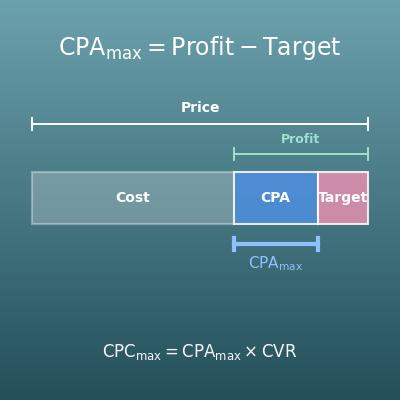
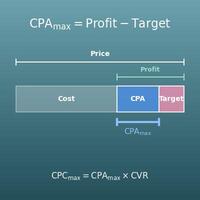
\(\mathrm{CPC}_{\max}\) \(=\) \(\mathrm{CPA}_{\mathrm{target}}\) \(\times\) \(\dfrac{\mathrm{CVR}}{100}\)
\(\mathrm{Clicks}_{\mathrm{needed}}\) \(=\) \(\mathrm{CV}_{\mathrm{target}}\) \(\div\) \(\dfrac{\mathrm{CVR}}{100}\)
\(\mathrm{Budget}\) \(=\) \(\mathrm{CPA}_{\mathrm{target}}\) \(\times\) \(\mathrm{CV}_{\mathrm{target}}\)
In words (symbols replaced with words)
③ \(\mathrm{CPC}_{\max}\): max CPC \(=\) ① \(\mathrm{CPA}_{\mathrm{target}}\): target CPA \(\times\) ② \(\mathrm{CVR} \div 100\): expected CVR
⑥ \(\mathrm{Clicks}_{\mathrm{needed}}\): clicks needed \(=\) ④ \(\mathrm{CV}_{\mathrm{target}}\): target conversions \(\div\) ⑤ \(\mathrm{CVR} \div 100\): expected CVR
⑨ \(\mathrm{Budget}\): budget needed \(=\) ⑦ \(\mathrm{CPA}_{\mathrm{target}}\): target CPA \(\times\) ⑧ \(\mathrm{CV}_{\mathrm{target}}\): target conversions
The formula in words
① Multiply the \(\mathrm{CPA}_{\mathrm{target}}\): target CPA
② by the \(\mathrm{CVR} \div 100\): expected CVR
③ and you get the \(\mathrm{CPC}_{\max}\): max CPC (the most you can pay for one click).
④ Divide the \(\mathrm{CV}_{\mathrm{target}}\): target conversions
⑤ by the \(\mathrm{CVR} \div 100\): expected CVR
⑥ and you get the \(\mathrm{Clicks}_{\mathrm{needed}}\): clicks needed (round up any fraction).
⑦ Multiply the \(\mathrm{CPA}_{\mathrm{target}}\): target CPA
⑧ by the \(\mathrm{CV}_{\mathrm{target}}\): target conversions
⑨ and you get the \(\mathrm{Budget}\): budget needed
Quick example
With a target CPA of $50, an expected CVR of 2% and a goal of 20 conversions, the max CPC, clicks needed and budget needed are
max CPC \(=\) target CPA ($50) \(\times\) expected CVR (\(2 \div 100\))
clicks needed \(=\) target conversions (20) \(\div\) expected CVR (\(2 \div 100\))
budget needed \(=\) target CPA ($50) \(\times\) target conversions (20)
\(50 \times 0.02 = 1\)
\(20 \div 0.02 = 1000\)
\(50 \times 20 = 1000\)
Key idea
The max CPC formula is just linking formula 1, \(\mathrm{CPA} = \mathrm{CPC} \div \mathrm{CVR}\) (with CVR as a decimal), solved for \(\mathrm{CPC}\). It means: "If one conversion may cost up to $50, and only 2 in 100 clicks convert, you can pay at most $1 per click." The budget needed is also "max CPC × clicks needed" (\(1 \times 1000 = 1{,}000\) dollars). If you also know the expected CTR, the impressions needed are \(\mathrm{Clicks}_{\mathrm{needed}} \div \dfrac{\mathrm{CTR}}{100}\) and the max CPM is \(\mathrm{CPC}_{\max} \times \dfrac{\mathrm{CTR}}{100} \times 1000\) (the calculator shows them when you enter a CTR). The expected CVR is an assumption based on past results and the like, so if the real CVR is lower, the CPA goes over the target. Use the results as an estimate that holds if the assumption comes true.
CPC, CPM and CPA are all "ad spend ÷ something"; only the divisor differs - clicks, impressions (in units of 1,000) or conversions. The three are linked by CTR and CVR through \(\mathrm{CPA} = \mathrm{CPC} \div \mathrm{CVR}\) and \(\mathrm{CPC} = \mathrm{CPM} \div 1000 \div \mathrm{CTR}\) (with CVR and CTR as decimals). Once the target CPA is set, the max CPC and the budget needed come from following these formulas backward.

Symbols and terms

Symbols

\(\mathrm{CPC}\) C P C Cost per click, found with \(\mathrm{CPC} = \mathrm{Cost} \div \mathrm{Clicks}\).
\(\mathrm{CPM}\) C P M Cost per mille (cost per 1,000 impressions); "mille" is Latin for 1,000. Found with \(\mathrm{CPM} = \mathrm{Cost} \div \mathrm{Imp} \times 1000\).
\(\mathrm{CPA}\) C P A Cost per acquisition, also called cost per action. Found with \(\mathrm{CPA} = \mathrm{Cost} \div \mathrm{CV}\).
\(\mathrm{CTR}\) C T R Click-through rate. "Click-through" means clicking an ad and going through to the next page. Found with \(\mathrm{CTR} = \mathrm{Clicks} \div \mathrm{Imp} \times 100\) (%).
\(\mathrm{CVR}\) C V R Conversion rate, found with \(\mathrm{CVR} = \mathrm{CV} \div \mathrm{Clicks} \times 100\) (%).
\(\mathrm{Cost}\) cost Ad spend, using the word "cost" itself as the symbol. The unit is dollars.
\(\mathrm{Imp}\) imp Impressions, from the first three letters of "impression" (one showing of an ad).
\(\mathrm{Clicks}\) clicks The number of times the ad was clicked.
\(\mathrm{CV}\) C V Conversions, from "conversion": the number of results such as purchases or sign-ups.
\(\mathrm{CPC}_{\max}\) C P C max Max CPC. The "max" (maximum) below the line means the highest cost per click that still meets the target CPA.
\(\mathrm{CPA}_{\mathrm{target}},\ \mathrm{CV}_{\mathrm{target}}\) C P A target, C V target The target values you enter in the reverse mode. "target" is added below the line to tell them apart from the actual \(\mathrm{CPA}\) and \(\mathrm{CV}\).
\(\mathrm{Budget}\) budget The budget needed: an estimate of the ad spend needed to get the target number of conversions.

Terms

cost per click (CPC) The ad cost for each click. It is the most basic cost for pay-per-click ads such as search ads and social media ads, and it has the same definition as "Avg. CPC" in ad platforms (cost ÷ clicks). The max CPC bid you set is a limit, which is different from the actual average CPC.
cost per 1,000 impressions (CPM) The cost for every 1,000 times an ad is shown. The key point is that it is per 1,000, not per impression. It is common for ads billed just for being shown (CPM billing), such as display and video ads.
cost per acquisition (CPA) The ad cost for each conversion (result). It shows how much it cost to win one customer, and it is the central measure for judging whether ads pay off. Decide what counts as a conversion (a purchase, a sign-up, a request for information and so on) and keep it fixed.
conversion One occurrence of the result an ad is for. The word means a viewer "converting" into a customer. It depends on your goal - a purchase for an online store, an inquiry for real estate, a sign-up for an app.
impression One showing of an ad on screen. If the same person sees it 3 times, that counts as 3 impressions (different from reach, which counts people).
click-through rate (CTR) The percentage of ad impressions that were clicked. It shows whether the headline and image catch the eye. The denominator is impressions.
conversion rate (CVR) The percentage of clicks that led to a conversion. It shows whether the page people land on after clicking (the landing page) and the product are appealing. The denominator is clicks (some people use sessions instead; this page always uses clicks).
max CPC The most you can pay for one click and still meet the target CPA, found as "target CPA × CVR". If you keep your actual bids at or below this, the CPA stays within the target as long as the expected CVR holds.
target CPA A target set in advance for the most ad spend you will pay for one conversion. The basic way to set it is to work back from the gross profit of the product (the profit left when one sells). With a CPA above the gross profit, looking only at that one sale, the more you advertise the more you lose (for products with repeat purchases, future profit such as customer lifetime value may also be counted).
CPM bidding A way of paying for ads where you are charged per 1,000 impressions. Whichever way you pay, the actual costs (CPM, CPC, CPA) are calculated with the same formulas and can be converted into each other.
pay per click (PPC) A way of paying for ads where you are charged for each click (CPC billing). Whichever way you pay, the actual costs (CPM, CPC, CPA) are calculated with the same formulas and can be converted into each other.
view-through conversion A conversion by someone who saw the ad without clicking it and converted later through another route. The CVR and CPA on this page assume that some of the people who click convert, so view-through conversions are not counted.

Good to know before you start

Here is what helps you use the calculation on this page with real understanding, not just by pressing the button.

Unit rates (Grade 6)
  • Knowing that "total ÷ count" gives "the amount for one" (CPC and CPA are the cost per click and per conversion)
  • Understanding how to compare in units other than 1, such as "per 1,000" (CPM)
Percents (Grade 6)
  • Knowing that a percent is found as "part ÷ whole" (CTR and CVR are rates)
  • Being able to switch between percents and decimals (\(2\% = 0.02\), \(0.2\% = 0.002\))
  • Noticing that the number changes depending on what the rate is based on (CTR is based on impressions, CVR on clicks)
Multiplying and dividing decimals (Grades 5–6)
  • Being able to divide by a decimal, as in \(3 \div 0.1\) or \(20 \div 0.02\) (dividing by a decimal less than 1 makes the answer bigger)
Expressions and rearranging equations (Grades 7–8)
  • Understanding a formula such as \(\mathrm{CPA} = \mathrm{CPC} \div \mathrm{CVR}\) and rearranging it to find another value, as in \(\mathrm{CPC} = \mathrm{CPA} \times \mathrm{CVR}\) (the formulas of the reverse mode)
Multiplying fractions and canceling (Grades 5–6)
  • Knowing that when you multiply fractions, a quantity in the middle cancels out, as in \(\dfrac{\mathrm{Cost}}{\mathrm{CV}} = \dfrac{\mathrm{Cost}}{\mathrm{Clicks}} \times \dfrac{\mathrm{Clicks}}{\mathrm{CV}}\) (why linking formula 1 works)

How to calculate it in Excel

Copy the whole table below and paste it into cell A1 in Excel. It works as is.
Table to find CPC, CPM and CPA
Ad spend Cost ($) 120
Impressions Imp 20000
Clicks 40
Conversions CV 4
Cost per click CPC ($) =B1/B3
Cost per 1,000 impressions CPM ($) =B1/B2*1000
Cost per acquisition CPA ($) =B1/B4
Table to find CTR and CVR
Impressions Imp 20000
Clicks 40
Conversions CV 4
Click-through rate CTR (%) =B2/B1*100
Conversion rate CVR (%) =B3/B2*100
Table to find CPC and CPA with the linking formulas
CPM ($) 6
Click-through rate CTR (%) 0.2
Conversion rate CVR (%) 10
Cost per click CPC ($) =B1/1000/(B2/100)
Cost per acquisition CPA ($) =B4/(B3/100)
Table to work back from targets
Target CPA ($) 50
Expected CVR (%) 2
Target conversions 20
Max CPC ($) =B1*B2/100
Clicks needed =ROUNDUP(B3/(B2/100),0)
Budget needed ($) =B1*B3
After pasting, column A holds the labels and column B holds the inputs and the calculated results.
In the first table, B1 to B4 are inputs, and B5 shows 3 (CPC), B6 shows 6 (CPM) and B7 shows 30 (CPA). The second table shows 0.2 (CTR) in B4 and 10 (CVR) in B5; the third shows 3 (CPC) in B4 and 30 (CPA) in B5; the fourth shows 1 (max CPC) in B4, 1000 (clicks needed) in B5 and 1000 (budget needed) in B6. Just replace the inputs with your own numbers.

How to calculate it in Google Sheets

Copy the whole table below and paste it into cell A1 in Google Sheets. It works as is.
Table to find CPC, CPM and CPA
Ad spend Cost ($) 120
Impressions Imp 20000
Clicks 40
Conversions CV 4
Cost per click CPC ($) =B1/B3
Cost per 1,000 impressions CPM ($) =B1/B2*1000
Cost per acquisition CPA ($) =B1/B4
Table to find CTR and CVR
Impressions Imp 20000
Clicks 40
Conversions CV 4
Click-through rate CTR (%) =B2/B1*100
Conversion rate CVR (%) =B3/B2*100
Table to find CPC and CPA with the linking formulas
CPM ($) 6
Click-through rate CTR (%) 0.2
Conversion rate CVR (%) 10
Cost per click CPC ($) =B1/1000/(B2/100)
Cost per acquisition CPA ($) =B4/(B3/100)
Table to work back from targets
Target CPA ($) 50
Expected CVR (%) 2
Target conversions 20
Max CPC ($) =B1*B2/100
Clicks needed =ROUNDUP(B3/(B2/100),0)
Budget needed ($) =B1*B3
The same formulas as in Excel (including ROUNDUP) work as is. Copy the whole table, paste it into cell A1, and replace the inputs with your own numbers.

How to calculate it in Python

import math

cost = 120           # ad spend ($)
impressions = 20000  # impressions
clicks = 40          # clicks
conversions = 4      # conversions

cpc = cost / clicks                    # cost per click
cpm = cost / impressions * 1000        # cost per 1,000 impressions
cpa = cost / conversions               # cost per acquisition
ctr = clicks / impressions * 100       # click-through rate (%)
cvr = conversions / clicks * 100       # conversion rate (%)

print(f"CPC: ${cpc}  CPM: ${cpm}  CPA: ${cpa}")
print(f"CTR: {ctr}%  CVR: {cvr}%")
print(f"Check the linking formula CPA = CPC / (CVR/100) = ${cpc / (cvr / 100)}")

# Working back: max CPC, clicks needed and budget needed from target CPA, expected CVR and target conversions
target_cpa = 50
assumed_cvr = 2
target_cv = 20
max_cpc = target_cpa * assumed_cvr / 100
clicks_needed = math.ceil(target_cv / (assumed_cvr / 100))
budget = target_cpa * target_cv
print(f"Max CPC: ${max_cpc}  Clicks needed: {clicks_needed}  Budget needed: ${budget}")
Runs with the standard library only. In this example the CPC is $3.0, the CPM $6.0, the CPA $30.0, the CTR 0.2% and the CVR 10.0%, and the linking formula check also gives $30.0. Working back, the max CPC is $1.0, the clicks needed are 1000 and the budget needed is $1000. Change the numbers at the top and run it.

How to write it in LaTeX and other math languages (copy and paste)

Formula for the cost per click (CPC)
CPC = Cost ÷ Clicks
\mathrm{CPC} = \dfrac{\mathrm{Cost}}{\mathrm{Clicks}}
<math xmlns="http://www.w3.org/1998/Math/MathML" display="block">
  <mrow>
    <mi mathvariant="normal">CPC</mi>
    <mo>=</mo>
    <mfrac><mi mathvariant="normal">Cost</mi><mi mathvariant="normal">Clicks</mi></mfrac>
  </mrow>
</math>
CPC = Cost/Clicks
cost/clicks
CPC := Cost/Clicks;
CPC = Cost/Clicks;
CPC = Cost/Clicks
Formula for the cost per 1,000 impressions (CPM)
CPM = Cost ÷ Imp × 1000
\mathrm{CPM} = \dfrac{\mathrm{Cost}}{\mathrm{Imp}} \times 1000
<math xmlns="http://www.w3.org/1998/Math/MathML" display="block">
  <mrow>
    <mi mathvariant="normal">CPM</mi>
    <mo>=</mo>
    <mfrac><mi mathvariant="normal">Cost</mi><mi mathvariant="normal">Imp</mi></mfrac>
    <mo>&#xD7;</mo>
    <mn>1000</mn>
  </mrow>
</math>
CPM = Cost/Imp xx 1000
cost/imp*1000
CPM := Cost/Imp*1000;
CPM = Cost/Imp*1000;
CPM = Cost/Imp × 1000
Formula for the cost per acquisition (CPA)
CPA = Cost ÷ CV
\mathrm{CPA} = \dfrac{\mathrm{Cost}}{\mathrm{CV}}
<math xmlns="http://www.w3.org/1998/Math/MathML" display="block">
  <mrow>
    <mi mathvariant="normal">CPA</mi>
    <mo>=</mo>
    <mfrac><mi mathvariant="normal">Cost</mi><mi mathvariant="normal">CV</mi></mfrac>
  </mrow>
</math>
CPA = Cost/CV
cost/cv
CPA := Cost/CV;
CPA = Cost/CV;
CPA = Cost/CV
Formulas for the click-through rate (CTR) and the conversion rate (CVR)
CTR = Clicks ÷ Imp × 100, CVR = CV ÷ Clicks × 100
\mathrm{CTR} = \dfrac{\mathrm{Clicks}}{\mathrm{Imp}} \times 100,\quad \mathrm{CVR} = \dfrac{\mathrm{CV}}{\mathrm{Clicks}} \times 100
<math xmlns="http://www.w3.org/1998/Math/MathML" display="block">
  <mrow>
    <mi mathvariant="normal">CTR</mi>
    <mo>=</mo>
    <mfrac><mi mathvariant="normal">Clicks</mi><mi mathvariant="normal">Imp</mi></mfrac>
    <mo>&#xD7;</mo>
    <mn>100</mn>
    <mo>,</mo>
    <mi mathvariant="normal">CVR</mi>
    <mo>=</mo>
    <mfrac><mi mathvariant="normal">CV</mi><mi mathvariant="normal">Clicks</mi></mfrac>
    <mo>&#xD7;</mo>
    <mn>100</mn>
  </mrow>
</math>
CTR = Clicks/Imp xx 100, CVR = CV/Clicks xx 100
{clicks/imp*100, cv/clicks*100}
CTR := Clicks/Imp*100; CVR := CV/Clicks*100;
CTR = Clicks/Imp*100; CVR = CV/Clicks*100;
CTR = Clicks/Imp × 100, CVR = CV/Clicks × 100
CPA from CPC and CVR (linking formula 1)
CPA = CPC ÷ (CVR/100)
\mathrm{CPA} = \dfrac{\mathrm{CPC}}{\mathrm{CVR}/100}
<math xmlns="http://www.w3.org/1998/Math/MathML" display="block">
  <mrow>
    <mi mathvariant="normal">CPA</mi>
    <mo>=</mo>
    <mfrac>
      <mi mathvariant="normal">CPC</mi>
      <mrow><mi mathvariant="normal">CVR</mi><mo>/</mo><mn>100</mn></mrow>
    </mfrac>
  </mrow>
</math>
CPA = CPC/(CVR/100)
cpc/(cvr/100)
CPA := CPC/(CVR/100);
CPA = CPC/(CVR/100);
CPA = CPC/(CVR/100)
CPC from CPM and CTR (linking formula 2)
CPC = CPM ÷ 1000 ÷ (CTR/100)
\mathrm{CPC} = \dfrac{\mathrm{CPM}}{1000 \times \mathrm{CTR}/100}
<math xmlns="http://www.w3.org/1998/Math/MathML" display="block">
  <mrow>
    <mi mathvariant="normal">CPC</mi>
    <mo>=</mo>
    <mfrac>
      <mi mathvariant="normal">CPM</mi>
      <mrow><mn>1000</mn><mo>&#xD7;</mo><mi mathvariant="normal">CTR</mi><mo>/</mo><mn>100</mn></mrow>
    </mfrac>
  </mrow>
</math>
CPC = CPM/(1000 xx CTR/100)
cpm/(1000*ctr/100)
CPC := CPM/(1000*CTR/100);
CPC = CPM/(1000*CTR/100);
CPC = CPM/(1000 × CTR/100)
Working back from targets (max CPC, clicks needed and budget needed)
CPC_max = CPA_target × (CVR/100), Clicks_needed = CV_target ÷ (CVR/100), Budget = CPA_target × CV_target
\mathrm{CPC}_{\max} = \mathrm{CPA}_{\mathrm{target}} \times \dfrac{\mathrm{CVR}}{100},\quad \mathrm{Clicks}_{\mathrm{needed}} = \dfrac{\mathrm{CV}_{\mathrm{target}}}{\mathrm{CVR}/100},\quad \mathrm{Budget} = \mathrm{CPA}_{\mathrm{target}} \times \mathrm{CV}_{\mathrm{target}}
<math xmlns="http://www.w3.org/1998/Math/MathML" display="block">
  <mrow>
    <msub><mi mathvariant="normal">CPC</mi><mi>max</mi></msub>
    <mo>=</mo>
    <msub><mi mathvariant="normal">CPA</mi><mi>target</mi></msub>
    <mo>&#xD7;</mo>
    <mfrac><mi mathvariant="normal">CVR</mi><mn>100</mn></mfrac>
    <mo>,</mo>
    <msub><mi mathvariant="normal">Clicks</mi><mi>needed</mi></msub>
    <mo>=</mo>
    <mfrac>
      <msub><mi mathvariant="normal">CV</mi><mi>target</mi></msub>
      <mrow><mi mathvariant="normal">CVR</mi><mo>/</mo><mn>100</mn></mrow>
    </mfrac>
    <mo>,</mo>
    <mi mathvariant="normal">Budget</mi>
    <mo>=</mo>
    <msub><mi mathvariant="normal">CPA</mi><mi>target</mi></msub>
    <mo>&#xD7;</mo>
    <msub><mi mathvariant="normal">CV</mi><mi>target</mi></msub>
  </mrow>
</math>
CPC_max = CPA_target xx (CVR/100), Clicks_needed = CV_target/(CVR/100), Budget = CPA_target xx CV_target
{cpaTarget*cvr/100, cvTarget/(cvr/100), cpaTarget*cvTarget}
CPCmax := CPAtarget*CVR/100; ClicksNeeded := CVtarget/(CVR/100); Budget := CPAtarget*CVtarget;
CPCmax = CPAtarget*CVR/100; ClicksNeeded = CVtarget/(CVR/100); Budget = CPAtarget*CVtarget;
CPC_max = CPA_target × (CVR/100), Clicks_needed = CV_target/(CVR/100), Budget = CPA_target × CV_target

How to have ChatGPT  do the calculation

You are a calculation assistant for managing online ads. Do the following calculation by actually running Python code, and base your answer only on the numbers from the execution result (do not answer by mental math or guessing).

Last month's ad results were: ad spend $120, 20,000 impressions, 40 clicks and 4 conversions.
Find each of the following:
1. CPC (ad spend ÷ clicks)
2. CPM (ad spend ÷ impressions × 1000, per 1,000 impressions)
3. CPA (ad spend ÷ conversions)
4. CTR (clicks ÷ impressions × 100, in %) and CVR (conversions ÷ clicks × 100, in %)
5. A check that the linking formula CPA = CPC ÷ (CVR ÷ 100) matches the result of 3
6. For a different plan: with a target CPA of $50, an expected CVR of 2% and 20 target conversions, the max CPC (target CPA × CVR ÷ 100), the clicks needed (target conversions ÷ (CVR ÷ 100), rounded up) and the budget needed (target CPA × target conversions)

Show the formulas you used and the numbers from the execution result.

How to Use
  1. 1
    Enter your numbers
    Type the numbers you want to calculate with into the input fields
  2. 2
    Calculate
    Press the "Calculate" button
  3. 3
    Check the result
    The result appears on the spot. The same page also explains the idea behind the calculation and the formula
  DataChef Features
Easy and Free
Unlimited conversions for free.
No technical knowledge required.
Intuitive and user-friendly operation.

No Registration Required
Available immediately after access.
Can be used without registering personal information.

Safe and Secure
Fully SSL encrypted communication.
Automatic file deletion by clicking "download".

Fast
High-speed site access
and rapid file conversion.
No Watermark
No watermark.
No attribution required.
Commercial Use Available
Free for commercial use.
No need to contact us for commercial use permission.