Enter the two you know out of "Pre-tax price", "Tax rate (%)" and "Total price", leave the one you want to find blank, and press "Calculate". The missing value and the tax amount are calculated together.
Table of Contents
-
What you can do on this page
-
What is this calculation used for?
-
How to Use
-
Formula
-
Symbols and terms
-
Good to know before you start
-
How to calculate it in Excel
-
How to calculate it in Google Sheets
-
How to calculate it in Python
-
How to write it in LaTeX and other math languages (copy and paste)
-
How to have ChatGPT do the calculation
-
DataChef Features
-
Related Features
-
NumberChef Calculators List
What you can do on this page
- Enter any two of "pre-tax price", "tax rate (%)" and "total price", and the third one and the tax amount are found on the spot
- "What is $50 plus 8% tax?" "What was the price before tax on a $108 receipt?" - it works in both directions (adding tax and removing it)
- You type in the tax rate yourself, so it works for any US state and local sales tax rate, and for VAT or GST in other countries (such as 20% VAT in the UK or 10% GST in Australia)
- A plain-language explanation of the formulas and copy-and-paste formulas for Excel, Google Sheets and Python are all on this page
What is this calculation used for?
In the US, price tags usually do not include sales tax, so the total at the register is higher than the tag. At an 8% rate, a $40 item costs \(40 \times 1.08 = 43.20\) dollars.
Once you know your local multiplier (1.08 for 8%), you can estimate your total before you reach the register and see right away whether you are over budget.
Expense reports and small-business books often need the price and the tax recorded separately. For a $108 total at 8% tax, the pre-tax price is \(108 \div 1.08 = 100\) dollars and the tax is $8. With 20% UK VAT, a £120 receipt is £100 plus £20 VAT (\(120 \div 1.2 = 100\)).
Removing tax from a total is the tax calculation used most in everyday bookkeeping.
"I want customers to pay a round $55 including 10% GST. What should the price before tax be?" Working this out is the reverse formula itself (\(55 \div 1.1 = 50\) dollars). Food trucks and event vendors that charge tax-included round prices do the same.
Sales tax you collect is not your money: businesses pass it on to the state (or, for VAT and GST, to the national tax agency). Estimating the tax inside your sales helps you plan how much money you really get to keep.
Because rates differ by state and city, the same purchase can cost different amounts. A $1,000 laptop costs \(1000 \times 1.06 = 1060\) dollars at a 6% rate, but \(1000 \times 1.095 = 1095\) dollars at a 9.5% rate - a $35 difference.
Knowing the rate where you buy (and whether an item is taxed there at all) helps you compare the real prices of big purchases.
Sales tax grows with the price, so big purchases come with big tax bills. On a $30,000 car at a 7% rate, the tax alone is \(30000 \times 0.07 = 2100\) dollars.
When you budget for a large purchase, it is important to know how much the tax itself will be, not just the price.
Formula
Symbols and terms
Symbols
| \(X\) | ex | The pre-tax price. The price of the item itself, before tax is added. |
| \(R\) | are | The tax rate (%). In the US it depends on the state, county and city; for 20% UK VAT, \(R = 20\). |
| \(Y\) | why | The total price. The price including tax, which is what you actually pay. |
| \(T\) | tee | The tax amount. The difference between the total price and the pre-tax price (\(T = Y - X\)). |
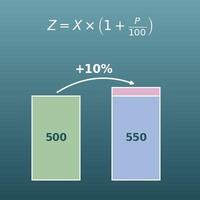
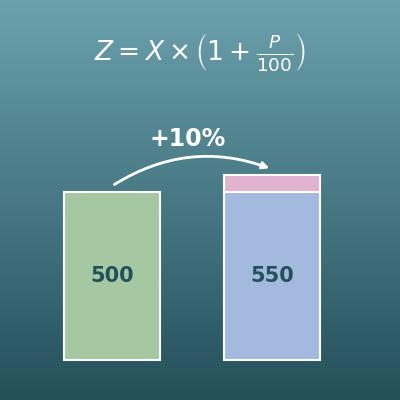
| \(1 + R \div 100\) | one plus R over 100 | The tax multiplier. It tells how many times the pre-tax price you pay - 1.08 for 8%, 1.2 for 20%. |
Terms
| sales tax | A tax on buying goods and services, paid by the customer and collected by the seller. In the US there is no national sales tax. Most states have a statewide rate, a few have none, and many counties and cities add a local rate on top. Which items are taxed also differs by state (for example, many states exempt groceries). |
| pre-tax price | The price of an item before tax. In the US, this is usually the price shown on the tag. |
| total price | The price including tax, which is what you actually pay. Also called the tax-inclusive price or the after-tax price. |
| VAT (value-added tax) | A tax on goods and services used in the UK, the European Union and many other countries, collected at each stage of production and sale. The UK standard rate is 20%. For the shopper, the math is the same as sales tax. |
| GST (goods and services tax) | The name for this kind of tax in countries such as Australia (10%) and Canada (5% federal GST, combined with provincial tax as HST in some provinces). |
| tax-inclusive pricing | Showing prices with the tax already included. It is the rule for consumer prices in the UK, the EU and Australia. In the US, tag prices usually do not include sales tax, which is added at checkout. |
| reverse sales tax | Finding the pre-tax price from a total that includes tax, also called "backing out" the tax. You undo the multiplication by dividing - for 8% tax, divide the total by 1.08. |
| rounding | How fractions of a cent in the tax are handled. Sales tax is normally rounded to the nearest cent, usually on the receipt total, but the exact rules depend on the state. This page shows the tax rounded to the nearest cent for reference. |
Good to know before you start
Here is what helps you use the calculation on this page with real understanding, not just by pressing the button.
If you get stuck, going back over these topics is the quickest way forward.
| Percents (Grade 6) |
|
| Multiplying and dividing decimals (Grades 5–6) |
|
| Writing a percent increase as one multiplication (Grade 7) |
|
How to calculate it in Excel
| Pre-tax price | 50 |
| Tax rate (%) | 8 |
| Total price | =B1*(1+B2/100) |
| Pre-tax price | 50 |
| Tax rate (%) | 8 |
| Tax amount | =B1*B2/100 |
| Total price | 108 |
| Tax rate (%) | 8 |
| Pre-tax price | =B1/(1+B2/100) |
| Pre-tax price | 20 |
| Total price | 21.45 |
| Tax rate (%) | =(B2/B1-1)*100 |
In the first table, for example, B3 shows 50 × 1.08 = 54. Just replace B1 and B2 with your own numbers.
To round the tax to the nearest cent, wrap the formula in the ROUND function, as in =ROUND(B1*B2/100,2).
How to calculate it in Google Sheets
| Pre-tax price | 50 |
| Tax rate (%) | 8 |
| Total price | =B1*(1+B2/100) |
| Pre-tax price | 50 |
| Tax rate (%) | 8 |
| Tax amount | =B1*B2/100 |
| Total price | 108 |
| Tax rate (%) | 8 |
| Pre-tax price | =B1/(1+B2/100) |
| Pre-tax price | 20 |
| Total price | 21.45 |
| Tax rate (%) | =(B2/B1-1)*100 |
The ROUND function for rounding to the nearest cent works in Google Sheets as is.
How to calculate it in Python
net_price = 50    # pre-tax price
tax_rate = 8      # tax rate (%). Use your state and local rate, or 20 for UK VAT

tax_amount = net_price * tax_rate / 100   # tax amount
gross_price = net_price + tax_amount      # total price
print(f"Tax amount: {tax_amount}")
print(f"Total price: {gross_price}")

# Remove tax from a total to get the pre-tax price (reverse sales tax)
gross_price2 = 108    # total price
tax_rate2 = 8         # tax rate (%)
net_price2 = gross_price2 / (1 + tax_rate2 / 100)
# Decimal arithmetic can give a result slightly off, such as 99.99999999999999, so round it for display
print(f"Pre-tax price: {round(net_price2, 2)}")
How to write it in LaTeX and other math languages (copy and paste)
Y = X × (1 + R ÷ 100)
Y = X \times \left(1 + \frac{R}{100}\right)
<math xmlns="http://www.w3.org/1998/Math/MathML" display="block">
<mrow>
<mi>Y</mi>
<mo>=</mo>
<mi>X</mi>
<mo>×</mo>
<mrow>
<mo>(</mo>
<mn>1</mn>
<mo>+</mo>
<mfrac><mi>R</mi><mn>100</mn></mfrac>
<mo>)</mo>
</mrow>
</mrow>
</math>
Y = X xx (1 + R/100)
net*(1 + rate/100)
gross := net*(1 + rate/100);
gross = net*(1 + rate/100);
Y = X × (1 + R/100)
T = X × R ÷ 100
T = X \times \frac{R}{100}
<math xmlns="http://www.w3.org/1998/Math/MathML" display="block">
<mrow>
<mi>T</mi>
<mo>=</mo>
<mi>X</mi>
<mo>×</mo>
<mfrac><mi>R</mi><mn>100</mn></mfrac>
</mrow>
</math>
T = X xx R/100
net*rate/100
tax := net*rate/100;
tax = net*rate/100;
T = X × R/100
X = Y ÷ (1 + R ÷ 100)
X = \frac{Y}{1 + \frac{R}{100}}
<math xmlns="http://www.w3.org/1998/Math/MathML" display="block">
  <mrow>
    <mi>X</mi>
    <mo>=</mo>
    <mfrac>
      <mi>Y</mi>
      <mrow>
        <mn>1</mn>
        <mo>+</mo>
        <mfrac><mi>R</mi><mn>100</mn></mfrac>
      </mrow>
    </mfrac>
  </mrow>
</math>
X = Y/(1 + R/100)
gross/(1 + rate/100)
net := gross/(1 + rate/100);
net = gross/(1 + rate/100);
X = Y/(1 + R/100)
R = (Y ÷ X − 1) × 100
R = \left(\frac{Y}{X} - 1\right) \times 100
<math xmlns="http://www.w3.org/1998/Math/MathML" display="block">
<mrow>
<mi>R</mi>
<mo>=</mo>
<mrow>
<mo>(</mo>
<mfrac><mi>Y</mi><mi>X</mi></mfrac>
<mo>−</mo>
<mn>1</mn>
<mo>)</mo>
</mrow>
<mo>×</mo>
<mn>100</mn>
</mrow>
</math>
R = (Y/X - 1) xx 100
(gross/net - 1)*100
rate := (gross/net - 1)*100;
rate = (gross/net - 1)*100;
R = (Y/X - 1) × 100
How to have ChatGPT do the calculation
You are a calculation assistant for sales tax. Do the following calculations by actually running Python code, and base your answer only on the numbers from the execution result (do not answer by mental math or guessing).

1. The tax amount and the total price for a pre-tax price of $50 at a tax rate of 8%
2. The pre-tax price and the tax amount for a total price of $108 at a tax rate of 8%
3. The tax rate (%) when a $20.00 item comes to $21.45 including tax

Show the formulas you used and the numbers from the execution result.
How to Use
-
1Enter your numbersType the numbers you want to calculate with into the input fields
-
2CalculatePress the "Calculate" button
-
3Check the resultThe result appears on the spot. The same page also explains the idea behind the calculation and the formula
DataChef Features

No technical knowledge required.
Intuitive and user-friendly operation.

Can be used without registering personal information.

Automatic file deletion by clicking "download".

and rapid file conversion.

No attribution required.

No need to contact us for commercial use permission.
Related Features
Percentage Change Calculator (Increase and Decrease)
Enter any two of the old value, the percent change and the new value, and get the third (X% more or X% less)
Percentage Calculator (Percent, Part and Whole)
Enter any two of the base amount, the part and the percentage, and get the third

Percent Difference Calculator
Divides the difference between two values by their average and shows it as a percentage (for comparisons with no clear base value)