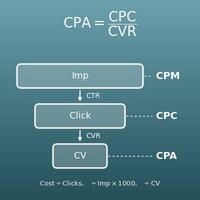
Enter the two values you know out of visits, conversions and conversion rate CVR (%), leave the other blank, and press "Calculate". The blank value is calculated, and a graph shows visits and conversions.
Table of Contents
-
What you can do on this page
-
What is this calculation used for?
-
How to Use
-
Formulas and figures
-
Symbols and terms
-
Good to know before you start
-
How to calculate it in Excel
-
How to calculate it in Google Sheets
-
How to calculate it in Python
-
How to write it in LaTeX and other math languages (copy and paste)
-
How to have ChatGPT do the calculation
-
DataChef Features
-
Related Features
-
NumberChef Calculators List
What you can do on this page
- Enter the two values you know out of visits (clicks, sessions or users), conversions and conversion rate CVR (%), and the third is calculated
- "2,000 clicks and 50 conversions - what is the CVR?" "How many visits do I need for 30 conversions at a 2.5% CVR?" "How many conversions will 5,000 visits bring at 1.8%?" This one page answers all three common questions in ad management and website improvement
- The visits needed are a count of people or times, so they are rounded up, and the visits needed per conversion (\(100 \div \mathrm{CVR}\)) are shown too
- A funnel-style bar chart shows visits and conversions at a glance
- A plain-language explanation of the formulas and copy-and-paste formulas for Excel, Google Sheets and Python are all on this page
What is this calculation used for?
If your ad platform shows "2,000 clicks, 50 conversions", the CVR is \(50 \div 2000 \times 100 = 2.5\)%. CVR is the most basic measure of ad results, used to compare ads or search keywords by how likely they are to lead to results.
But ad platforms base CVR on clicks, while web analytics tools base it on sessions, so the ways of counting can differ. That is why the numbers for the same ad can disagree; when comparing, use the same denominator.
Say your goal this month is 30 sign-ups and your CVR so far is 2.5%. The clicks needed are \(30 \times 100 \div 2.5 = 1200\). If the average cost per click (CPC) is $2.50, the budget is about \(1200 \times \$2.50 = \$3{,}000\).
Working back like this, from target conversions to visits needed to budget, is the basic flow of ad planning. If CVR drops to 1.25%, the clicks needed double to 2,400, so the numbers also show that improving CVR is an effective way to keep the budget down.
Say a sign-up page gets 5,000 sessions a month and its CVR improves from 1% to 2%. Expected conversions go from \(5000 \times 1 \div 100 = 50\) to \(5000 \times 2 \div 100 = 100\), doubling results without any more traffic.
Doubling traffic would cost roughly twice as much in ads, but a page improvement keeps working once it is made. This estimate helps you compare "more traffic or a higher CVR?" and set priorities (to judge whether the CVR really went up, you need enough sessions).
If an online store gets 10,000 sessions a month and 120 purchases, the purchase rate (CVR) is \(120 \div 10000 \times 100 = 1.2\)%. Put the other way, only about 1 in 83 sessions buys something (\(100 \div 1.2 \approx 83.3\)), which is a prompt to look for room to improve the product pages and the checkout.
Revenue can be broken down as "sessions × CVR × average order value", so CVR is one of the three factors that move revenue.
If 400 people visit the sign-up page for a webinar and 12 sign up, the sign-up rate is \(12 \div 400 \times 100 = 3\)%. The idea of CVR is not limited to ads: it applies whenever you measure what percent of visitors took action, such as job applications, newsletter sign-ups or document downloads.
If you want 30 people at the next webinar, at the same 3% sign-up rate you need \(30 \times 100 \div 3 = 1000\) visitors, which gives you a guide for how widely to promote it.
Formulas and figures
Symbols and terms
Symbols
| \(\mathrm{CVR}\) | C V R | Conversion rate. The percentage of visits that led to a conversion, found with \(\mathrm{CVR} = C \div N \times 100\). In ad platforms and reports it is also written as CR or "Conv. rate". |
| \(C\) | C | The number of conversions, from the first letter of "conversion". (Example - 50 sign-ups means \(C = 50\)) |
| \(N\) | N | The number of visits (clicks, sessions or users). N, from "number", is the usual letter for a count in math. (Example - 2,000 clicks means \(N = 2000\)) |
| \(V\) | V | The visits needed per conversion. This page uses V, from "visits", and finds it with \(V = 100 \div \mathrm{CVR}\). |
| \(\lceil\ \rceil\) | ceiling | The symbol for rounding the number inside up to a whole number (the ceiling function), as in \(\lceil 1666.67 \rceil = 1667\). It appears when you find a count of people or times, such as the visits needed. |
Terms
| conversion | An action counted as the goal of a site or an ad. For an online store it is a purchase; for a service site, a sign-up or a request for information; for an app, an install. Each site decides what counts. The word means the visitor "converted" into a customer. |
| conversion rate (CVR) | The percentage of visits that led to a conversion: \(\mathrm{CVR} = C \div N \times 100\). Even for the same site, the value depends on how the denominator is counted, so count the same way when comparing. |
| visits | The general name on this page for "how many came", the denominator of CVR. Ad management usually uses clicks, website analytics uses sessions, and a people-based view uses users. If the same person comes twice, that is 2 clicks or sessions but 1 user, so a CVR based on users comes out higher. |
| clicks | The number of times an ad or a search result was clicked. The conversion rate in ad platforms such as Google Ads is normally based on clicks (or on ad interactions). |
| session | One visit, from when a user arrives at a site until they leave. If the same person comes in the morning and at night, that is 2 sessions. The conversion rates in web analytics tools are often based on sessions (some tools show both a session-based and a user-based rate). |
| users | The number of people who visited a site in a period, each counted once. Also called unique visitors. |
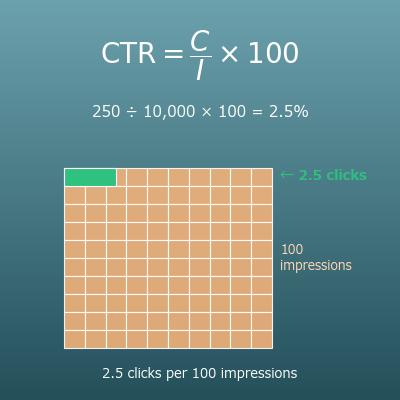
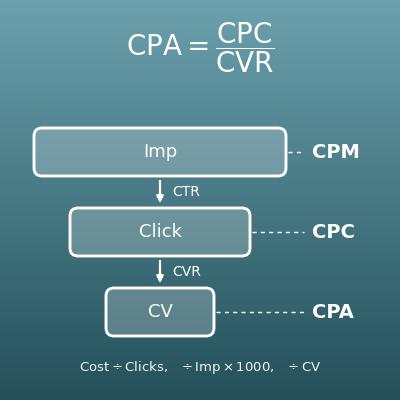
| click-through rate (CTR) | The percentage of the times an ad or a search result was shown that it was clicked. CTR covers "shown → clicked" and CVR covers "clicked → converted"; multiplying the two (as decimals) gives the rate from "shown" to "converted". |
| cost per acquisition (CPA) | The ad cost of getting one conversion. It is ad spend ÷ conversions, or from the cost per click (CPC) and CVR, \(\mathrm{CPA} = \mathrm{CPC} \times 100 \div \mathrm{CVR}\). When CVR goes up, CPA goes down. |
| cost per click (CPC) | The cost each time an ad is clicked. Multiply the visits (clicks) needed by the CPC to estimate the ad budget needed. |
| funnel | A way of picturing how the number of people shrinks at each step, such as impression → click → conversion, like the shape of a funnel. The graph on this page is a 2-step funnel from visits to conversions. |
| rounding up | If there is any decimal part, however small, going to the next whole number. The visits needed must be the smallest whole number that surely meets the target, so you round up rather than round to the nearest. |
| expected value | The value you can expect on average. "37.5 expected conversions" does not mean exactly 37.5, but about that many on average if the same conditions were repeated many times. |
Good to know before you start
Here is what helps you use the calculation on this page with real understanding, not just by pressing the button.
| Percents (Grade 6) |
|
| The percent equation (Grades 6–7) |
|
| Multiplying and dividing decimals (Grades 5–6) |
|
| Rounding (Grades 3–4) |
|
| Expressions and rearranging equations (Grades 7–8) |
|
How to calculate it in Excel
| Visits N | 2000 |
| Conversions C | 50 |
| CVR (%) | =B2/B1*100 |
| Target conversions C | 50 |
| Target CVR (%) | 3 |
| Visits needed N (rounded up) | =ROUNDUP(B1*100/B2,0) |
| Visits N | 5000 |
| CVR (%) | 1.8 |
| Expected conversions C | =B1*B2/100 |
| CVR (%) | 2.5 |
| Visits per conversion V | =100/B1 |
For example, the first table shows 2.5 in B3 (a 2.5% CVR), the second shows 1667 (visits needed, rounded up with the ROUNDUP function), the third shows 90 (expected conversions) and the fourth shows 40 in B2 (1 conversion in 40 clicks). Just replace the inputs with your own numbers.
How to calculate it in Google Sheets
| Visits N | 2000 |
| Conversions C | 50 |
| CVR (%) | =B2/B1*100 |
| Target conversions C | 50 |
| Target CVR (%) | 3 |
| Visits needed N (rounded up) | =ROUNDUP(B1*100/B2,0) |
| Visits N | 5000 |
| CVR (%) | 1.8 |
| Expected conversions C | =B1*B2/100 |
| CVR (%) | 2.5 |
| Visits per conversion V | =100/B1 |
How to calculate it in Python
import math

visits = 2000        # visits (clicks, etc.)
conversions = 50     # conversions

cvr = conversions / visits * 100        # CVR (%)
visits_per_cv = 100 / cvr               # visits needed per conversion
print(f"CVR: {cvr}%")
print(f"Visits per conversion: {visits_per_cv}")

# Working backward: visits needed from target conversions and target CVR (rounded up)
target_conversions = 50   # target conversions
target_cvr = 3            # target CVR (%)
needed_visits = math.ceil(target_conversions * 100 / target_cvr)
print(f"Visits needed: {needed_visits}")

# Forecast: expected conversions from visits and CVR
visits2 = 5000    # visits
cvr2 = 1.8        # CVR (%)
expected_conversions = visits2 * cvr2 / 100
print(f"Expected conversions: {expected_conversions}")
How to write it in LaTeX and other math languages (copy and paste)
CVR = C ÷ N × 100
\mathrm{CVR} = \dfrac{C}{N} \times 100
<math xmlns="http://www.w3.org/1998/Math/MathML" display="block">
<mrow>
<mi>CVR</mi>
<mo>=</mo>
<mfrac><mi>C</mi><mi>N</mi></mfrac>
<mo>×</mo>
<mn>100</mn>
</mrow>
</math>
CVR = C/N xx 100
c/n*100
CVR := C/N*100;
CVR = C/N*100;
CVR = C/N × 100
N = ⌈C × 100 ÷ CVR⌉
N = \left\lceil \dfrac{C \times 100}{\mathrm{CVR}} \right\rceil
<math xmlns="http://www.w3.org/1998/Math/MathML" display="block">
<mrow>
<mi>N</mi>
<mo>=</mo>
<mo>⌈</mo>
<mfrac>
<mrow><mi>C</mi><mo>×</mo><mn>100</mn></mrow>
<mi>CVR</mi>
</mfrac>
<mo>⌉</mo>
</mrow>
</math>
N = |~ (C xx 100)/(CVR) ~|
Ceiling[c*100/cvr]
N := ceil(C*100/CVR);
N = ceil(C*100/CVR);
N = ⌈(C × 100)/CVR⌉
C = N × CVR ÷ 100
C = N \times \dfrac{\mathrm{CVR}}{100}
<math xmlns="http://www.w3.org/1998/Math/MathML" display="block">
<mrow>
<mi>C</mi>
<mo>=</mo>
<mi>N</mi>
<mo>×</mo>
<mfrac><mi>CVR</mi><mn>100</mn></mfrac>
</mrow>
</math>
C = N xx CVR/100
n*cvr/100
C := N*CVR/100;
C = N*CVR/100;
C = N × CVR/100
How to have ChatGPT do the calculation
You are a calculation assistant for online marketing. Do the following calculation by actually running Python code, and base your answer only on the numbers from the execution result (do not answer by mental math or guessing).

An ad was clicked 2,000 times, and 50 of those clicks led to a sign-up (a conversion).
Find each of the following:
1. The conversion rate CVR (conversions ÷ visits × 100, in %)
2. The visits needed per conversion (100 ÷ CVR)
3. For a different page: with a 3% CVR, the clicks needed to get 50 sign-ups (conversions × 100 ÷ CVR, rounded up)
4. For a different page: the expected conversions for a page with a 1.8% CVR that gets 5,000 sessions (visits × CVR ÷ 100)

Show the formulas you used and the numbers from the execution result.
How to Use
-
1Enter your numbersType the numbers you want to calculate with into the input fields
-
2CalculatePress the "Calculate" button
-
3Check the resultThe result appears on the spot. The same page also explains the idea behind the calculation and the formula
DataChef Features

No technical knowledge required.
Intuitive and user-friendly operation.

Can be used without registering personal information.

Automatic file deletion by clicking "download".

and rapid file conversion.

No attribution required.

No need to contact us for commercial use permission.
Related Features
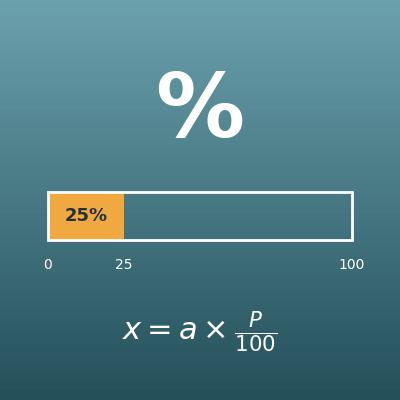
Percentage Calculator (Percent, Part and Whole)
Enter any two of the whole, the part and the percentage, and get the third. For percentages in general, not just CVR
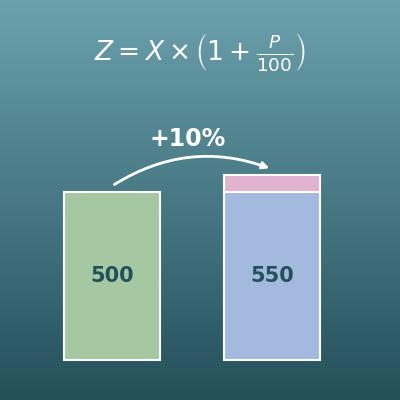
Percentage Change Calculator (Increase and Decrease)
Finds how many percent something went up or down, for example how much CVR improved when it rose from 2.0% last month to 2.5%
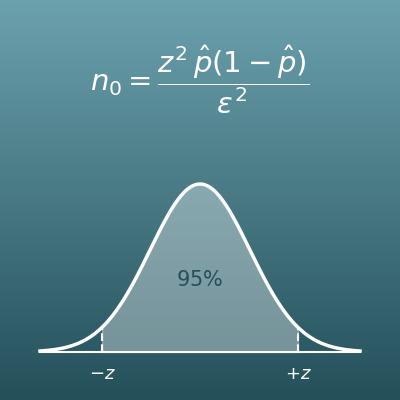
Sample Size Calculator (Surveys and Margin of Error)
Finds the sample size needed from the margin of error and confidence level. The basis for asking how much data you need before a CVR can be trusted
CTR Calculator (Click-Through Rate from Impressions and Clicks, Impressions Needed)
Enter any two of impressions, clicks and CTR to get the third. Also finds the impressions needed for a target number of clicks
CPC, CPM and CPA Calculator (Ad Cost Metrics and Budget from Target CPA)
Finds the three ad cost metrics from ad spend, impressions, clicks and conversions, and works back from a target CPA to the max CPC and the budget needed